By [Author Name] · [Date] · [X] min read · [Table of Contents]
TL;DR
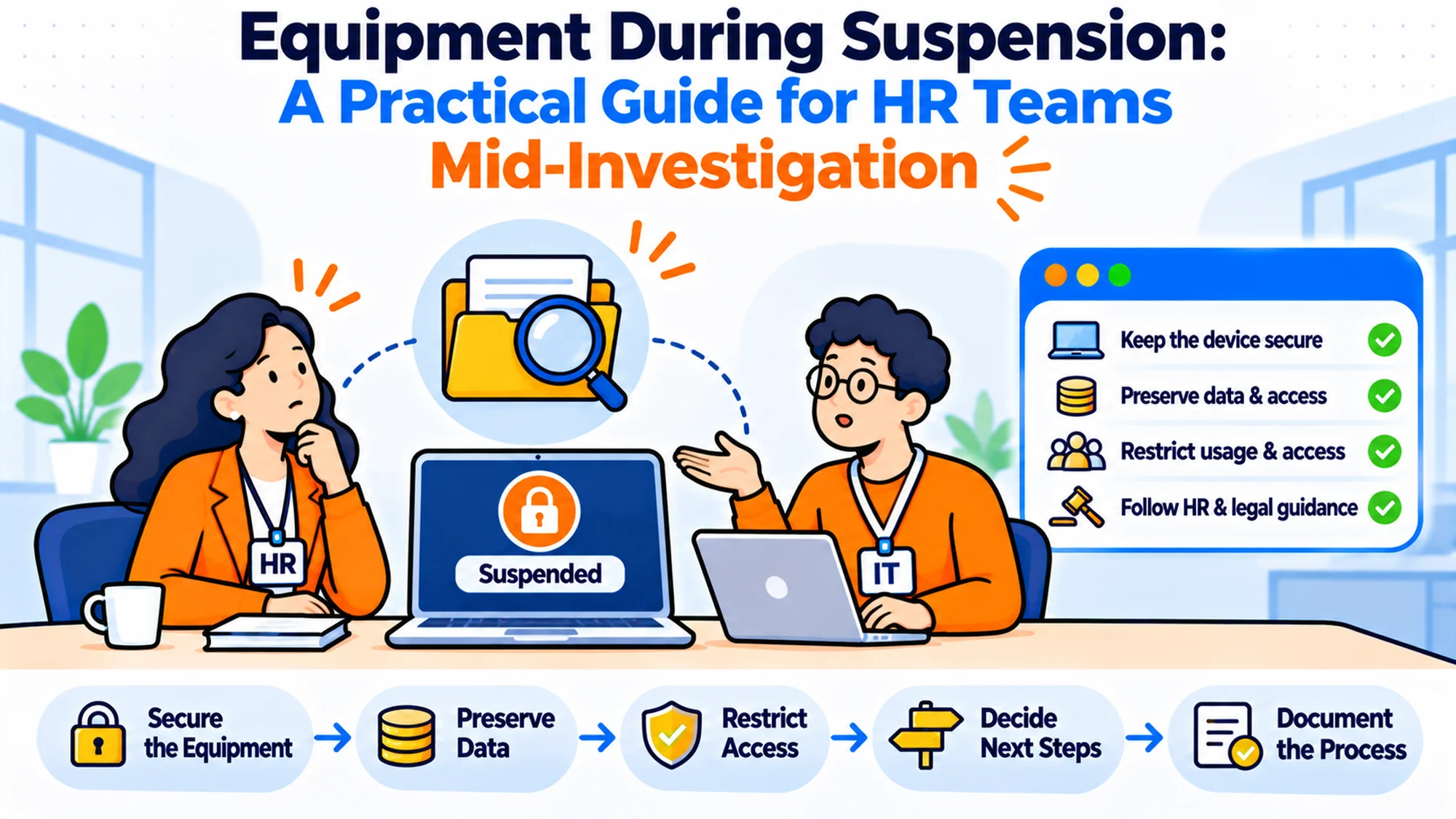
- Equipment during suspension is the question of what happens to someone's laptop, phone and access while they are not working but still employed.
- If you have never suspended anybody, you don't need a policy. You need one paragraph in the process and a named decision-maker.
- It does three jobs: it protects the investigation, it keeps the person's position intact, and it stops the decision being made at speed by whoever is nearest.
- Four options exist: leave everything, suspend access only, collect the device, or image it and return it.
- Choose based on what you are actually protecting, not on how serious the allegation sounds.
- Done right, the equipment decision is made in ten minutes and nobody has to improvise in front of the person.
The call happens at four on a Thursday. Somebody is being suspended tomorrow morning, the conversation is already booked, and an hour before it a manager asks whether they should take the laptop. Nobody has an answer. Somebody suggests collecting it to be safe, somebody else points out the person needs it to respond to anything, and the decision gets made in the corridor by whoever sounds most confident.
These aren't edge cases. A company that has suspended three people in 11 years has no muscle memory for it, and the 2 people who handled the last one left 17 months ago. Another has a detailed suspension process that covers pay, communication and timelines, and says nothing at all about hardware, because it was written by people thinking about employment rather than about laptops.
Best tools for HR Operations
The real issue isn't whether to take the device. It's that nobody decided in advance who makes the call and what they are protecting, so the answer comes from whoever is most anxious in the room.
When You Don't Actually Need a Suspension Equipment Policy
Stage one: one paragraph is genuinely enough. If suspensions happen once every few years and you have fewer than 100 people, a full policy is overhead you will never recoup. What you need is a line in the existing process naming who decides and listing the four options, which takes an afternoon to write and nothing to maintain.
Stage two: friction appears. You suspend two people in a year and handle the equipment differently each time, for no reason either of them could see. That inconsistency is the thing that gets raised later, and it is harder to defend than either individual decision was.
Stage three: it becomes a liability. Somebody is suspended, the laptop is collected on instinct, and it turns out to hold the only copy of something the investigation needs to look at properly. Or the opposite: it is left in place and wiped by an automated process two weeks later because the suspension never stopped the offboarding automation it accidentally triggered.
Stage four: the edge case. The person is in another country, or holds a device you cannot get back quickly, or is suspended as part of something that may become a formal dispute. That's where an improvised decision costs the most, and it is also where the cost is least visible at the time.
What HR Teams Actually Need from an Equipment Decision
> "Do we take the laptop or not?" > Usually not, and the instinct to take it is stronger than the reasons for it. > Collecting a device is a visible act that communicates a great deal to everybody watching, and it is hard to reverse once done.
> "What are we actually protecting?" > Name it before choosing. Data, evidence, or the person's ability to respond. > Those three point to different answers, and conflating them is how a team collects a laptop it did not need and loses access it did.
> "How does the person respond to anything without their machine?" > That has to be answered before the conversation, not during it. > A suspended employee who cannot read the letter they have been sent is a problem you created rather than inherited.
> "Who is allowed to decide this?" > One named role, with a deputy, agreed in advance. > The alternative is the most senior person physically present, which is how the decision gets made on confidence rather than on reasoning.
> "What stops the automated offboarding?" > Check specifically, because suspension often looks like a leaver event to a system. > This is the failure that happens quietly, and it gets discovered weeks later when somebody notices that something has already been wiped.
There's a sixth question. It only surfaces the first time it bites. What happens to the device if the suspension ends and the person comes back? Teams that collected a laptop frequently have no plan for returning it, so somebody who has been cleared waits four days for hardware while the message that sends is entirely unintended.
The Four Options and What Each One Costs
Leave everything in place. What it is: the person keeps the device and retains access, and nothing changes technically. When it's right: most of the time, honestly. Where the concern is performance or conduct unrelated to systems or data, and where you want the person able to engage with the process. When it fails: where there is a genuine prospect of data being removed or altered, or where the allegation is about the use of those systems. Then leaving access in place is the decision you will be asked about.
Suspend access, leave the hardware. What it is: the person keeps the laptop; accounts are disabled or restricted. When it's right: the default middle option, and the one most teams should use more. It addresses the data concern without the visible act of taking somebody's equipment. When it fails: when the person then cannot receive or respond to correspondence about their own suspension, which is a predictable consequence that catches teams out repeatedly. Decide the communication route first.
Collect the device. What it is: the hardware comes back and goes into controlled storage, powered down. When it's right: where the device itself may matter later, or where the concern is specifically about what is on it. When it fails: as a precaution with no articulated reason. It is visible, it is slow to reverse, and in a distributed team it may take weeks and involve a courier, during which the device is in less controlled hands than if you had left it alone.
Image it and return it. What it is: a copy is taken under a defined process, the original goes back to the person. When it's right: where you need the contents preserved but the person needs a working machine, which is a more common combination than teams realise. When it fails: when attempted informally. A copy made by a helpful colleague is unlikely to be adequate for anything that becomes formal, and it is worth knowing in advance who could do this properly and roughly what they charge.
I've watched teams reach for option three when option two was what they actually wanted. Every time, the reasoning was that it felt safer.
| Option | Protects data? | Person can respond? | Visible? | Reversible? |
|---|---|---|---|---|
| Leave everything | No | Yes | No | Yes |
| Suspend access only | Yes | Needs a route | Barely | Yes |
| Collect the device | Yes | No | Very | Slowly |
| Image and return | Yes | Yes | Somewhat | Yes |
How to Choose: Five Questions Before the Conversation
What are you protecting? Write it in one sentence. If the sentence is "we want to be careful" you have not answered it, and that answer leads to collecting hardware for no stated reason. Data, evidence, or the integrity of the process are the three real answers and they point different ways.
Is the allegation about the systems? This is the single most useful discriminator. Where the concern involves data, access or the use of company systems, the access question becomes urgent and the hardware question follows from it. Where it doesn't, taking the device is almost always the wrong move.
How will the person respond? Decide the route before you remove anything. Personal email, post, a named contact who will phone them. Teams that disable access without settling this find themselves unable to send somebody the document they are supposed to be responding to.
Can you actually collect it? In the same building, yes, within the hour. In another country, you are looking at a courier, a lead time measured in weeks, and a device in transit rather than in a cupboard. That changes which option is genuinely available rather than theoretically preferable.
What stops the automation? Check what your systems do when a status changes. Suspension frequently resembles a leaver event closely enough to trigger something, and the thing it triggers is sometimes a wipe. Prove this once rather than assuming.
Six Platforms Worth Knowing
RemoAsset Best for: distributed teams that need to know where a device is before deciding anything about it. Why companies choose it: it handles procurement and retrieval across 80+ countries and records each device through issue and return, which answers the first question a suspension raises in a distributed team, namely where the machine physically is and whether anything is already in motion. Pricing is published, from $1,499 a year on the Subscription tier for companies with 50 to 5,000+ employees, including a 60 per cent reduction on retrieval charges. It's our own product, so weigh that accordingly. Where it struggles: it has no network discovery, so it cannot tell you about a device that never made it into the register, which is exactly the machine you would most want to know about. No software licence management either, so the access side of this is somebody else's system entirely. And only the Subscription tier publishes a figure, with pay-as-you-go quoted. It performs no imaging and makes no decision for you.
Workwize Best for: teams that want a device going into controlled storage rather than a cupboard. Why companies choose it: its own warehouses, which gives a collected device somewhere defined to go. Where it struggles: no published rate card. The figures on its pricing page are savings claims rather than prices. The live domain is goworkwize.com now, and the older address no longer resolves.
Firstbase Best for: getting a replacement machine out quickly. Why companies choose it: strong supply side, clean subscription shape. Where it struggles: publishes nothing on price, and the supply-led model makes it weaker as a system of record for hardware you already owned.
GroWrk Best for: teams wanting the arrangement scoped around them. Why companies choose it: flexible service design rather than a fixed package. Where it struggles: no rate card. Its pricing page runs a competitor cost estimator whose figures are its own estimates rather than published prices, so none of them belongs in a budget paper.
allwhere Best for: handing the logistics over entirely. Why companies choose it: managed service with minimal internal lift. Where it struggles: publishes nothing, so there is no way to compare before a conversation.
Deel IT Best for: companies already running employment through Deel. Why companies choose it: hardware and employment in one relationship, which does reduce the number of parties involved in a sensitive situation. Where it struggles: weaker standalone, and no published pricing.
The Decision Table: Matching the Situation to the Option
| Situation | Scale | Setup | Primary Pain | Recommended Starting Point |
|---|---|---|---|---|
| Conduct unrelated to systems | Any | Single site | Deciding at speed | Leave everything in place |
| Concern involves data or access | Any | Any | Access risk | Suspend access, keep hardware |
| Device contents may matter | Any | Same country | Evidence | Image it and return it |
| Person is overseas | Any | Distributed | Collection takes weeks | Suspend access, device stays |
| You cannot locate the device | Any | Weak register | Unknown holder | RemoAsset, then decide |
| Automation may wipe it | Any | HR-triggered offboarding | Irreversible loss | Stop the automation first |
Most situations sit in two rows at once. Start with whichever risk you could not undo.
A note on the first column. The situations are deliberately described by what is at stake rather than by how serious the allegation is, because seriousness is the input teams reach for and it is the one that predicts the right answer least well. A minor conduct question involving the finance system needs the access decision far more urgently than a grave allegation about behaviour in a meeting room, and sorting by gravity gets both of those backwards.
Stop the Automation Before Anything Else
This is the step that gets missed, and it is the only one on this page that destroys something permanently.
Modern offboarding is connected to the HR system. For good reasons, mostly. A status change fires, the device is marked for collection, accounts are disabled, and a wipe is queued. That design is correct for the overwhelming majority of departures and it is dangerous for a suspension, because a suspension is not a departure and the system frequently cannot tell the difference.
Find out what yours does. Not by reading the documentation, which describes the intent, but by checking what a status change to suspended actually triggers in each connected system. Teams that do this discover one of three things: nothing happens, which is fine; access is disabled, which may be what you want but should be a decision; or something is queued against the device, which needs stopping before the conversation happens rather than afterwards.
The window matters. Where a wipe is automated, the gap between a status change and the device becoming unrecoverable can be hours rather than days, which means a suspension recorded on Friday afternoon can have consequences before anybody looks on Monday. So the pause has to be available at the point the status is changed, to the person changing it.
And it needs to be a pause rather than a reversal. Stopping a queued wipe is straightforward. Recovering a wiped machine is not, and the honest answer in that situation is to say what happened and when, which is a conversation nobody wants to have for want of a checkbox.
The Communication Route Nobody Plans
Here's a predictable problem that still catches teams out. You disable somebody's access, which was the right call, and then need to send them a letter about the thing they are suspended over. They cannot read it, because you disabled the account it would go to.
Decide the route before the conversation. For most teams that means a personal email address held on file, confirmed as current, plus a named person who will phone if nothing is acknowledged within an agreed period. Post is slower and sometimes appropriate. The point is that it is decided rather than discovered.
Check the address is actually current. Personal contact details go stale in HR systems faster than anybody expects, and the moment you need one is the moment you cannot ask the person for it through the usual channel. A quick confirmation during the suspension conversation itself solves this, and it is worth adding to whatever script the person holding that conversation is working from.
There's a related point here. It changes the calculation about the device. If the person keeps their laptop but loses access, they have a machine that does nothing, which is a slightly absurd situation that sometimes argues for collecting it after all. If they keep limited access, say to email only, they can engage with the process on the hardware they already have, which is usually the better outcome for everybody.
Think about what they can still reach. Not just what you switched off. A suspended person who can read correspondence and nothing else is in a workable position. One who can reach nothing is in a position you will have to solve some other way, probably at short notice.
A Timeline That Works
Here is the shape, rather than a policy. The useful insight is that almost everything that matters happens before the conversation, not during it.
| When | Who | Action |
|---|---|---|
| Before the conversation | HR plus IT | Stop any automation, confirm where the device is |
| Before the conversation | Named decision-maker | Choose the option, record the reason |
| Before the conversation | HR | Confirm the personal contact details |
| During | The person holding it | State plainly what happens to the device and access |
| Within 24 hours | IT | Apply the access change, confirm it worked |
| Within 48 hours | HR | Confirm the person can receive correspondence |
| Ongoing | Named owner | Keep the access log, keep the device powered down |
| On conclusion | Named decision-maker | Reinstate or offboard, with a stated lead time |
The first three rows are the ones that get skipped, and they are the only ones that are genuinely cheap. Stopping the automation takes a checkbox, choosing the option takes ten minutes once somebody is named, and confirming a personal email address takes a sentence in the conversation itself.
Say it plainly during. "You will keep your laptop, your email access will be suspended from this afternoon, and we will write to you at your personal address" is better than leaving the person to work it out from what does and does not still function. Most of the distress in this situation comes from uncertainty rather than from the suspension.
Then check the access change actually applied. Half-applied access changes are common, usually because one system was missed, and the version where somebody retains access they should not have is worse than either clean outcome.
The Handoff Between HR and IT
The article keeps saying "HR plus IT" as though that is one unit. It isn't, and the gap between them is where most of the operational failure in this sits.
HR knows a suspension is coming. Often days in advance. IT finds out when the ticket arrives, which is frequently an hour before or an hour after the conversation. That asymmetry is the whole problem, because every cheap action on this page has to happen before the conversation and only IT can perform it.
Fix it with a heads-up rather than a process. A named IT contact told in confidence that something is coming, with no detail beyond the date and the person, is enough to stop the automation, check where the device is and have the access change ready to apply. That is a short conversation and it converts a scramble into a sequence.
What IT needs is narrow. Who, when, whether access is changing, whether the device is being collected, and who to confirm completion to. Five facts. Anything more is detail they do not need and should not be carrying, and handing it over creates a confidentiality problem nobody asked for.
What IT should not be asked for is a judgement. The decision about the device belongs to the named decision-maker, and an IT lead asked to choose on the morning will reasonably choose the most protective option, which is how teams end up collecting hardware nobody decided to collect.
And confirm completion in writing, both ways. HR assuming the access change happened and IT assuming somebody checked is the version of this that produces a person retaining access for a fortnight.
What Collecting a Device Actually Signals
Worth being honest about this, because it is the part that rarely gets discussed and it drives more decisions than the data risk does.
Taking somebody's laptop is visible. In an office, people see it happen. In a remote team, a courier arrives at somebody's home. Either way it communicates something specific to the person and, within a day, to their colleagues, and what it communicates is usually stronger than whatever you intended. A suspension is by definition a situation where no conclusion has been reached, and collecting hardware reads as a conclusion.
That isn't a reason never to do it. It is a reason to be able to say why you did, in one sentence, and to have applied the same reasoning the last three times. Consistency is what makes a defensible decision; the specific choice matters less than whether it was made on a stated basis.
The reverse signal exists too and gets less attention. Leaving everything in place can read as a judgement that the matter is trivial, which is its own problem where the allegation is serious and somebody has raised it in good faith. The person who reported something and then watches nothing visibly change may reasonably conclude it is not being taken seriously.
So the useful framing is that both actions signal, and neither is neutral. Pick on the basis of what you are protecting, say so in the record, and accept that the signalling is a cost of either choice rather than something you can avoid.
What the Record Should Actually Say
The article so far has said twice that the basis matters more than the choice. So here is what that looks like written down, because "document the decision" is advice nobody can act on.
Four lines. What was decided about the device and the access, who decided it, what the stated reason was, and the date it was taken. That's the whole thing, and it fits in the case notes you are already keeping.
The reason line does the work. "Access suspended, hardware left with the employee, because the concern does not involve company systems and the employee needs to be able to respond" is a sentence somebody can read back in eight months and recognise as reasoning. "Device collected as a precaution" is not, and it is what most records actually say.
Write it at the time. A reconstruction assembled later reads as a reconstruction, and the chronology is specifically the thing that gets asked for, which means the contemporaneous note is worth more than a better-written one produced afterwards. It takes about two minutes.
Record the things that did not happen as well. If you considered collecting the device and decided against it, that is more useful than silence, because it shows the question was asked. Teams that only record actions leave a gap exactly where somebody later wonders whether anybody thought about it.
And keep the access list short. Note who has been able to reach the device or its contents, because that record cannot be rebuilt afterwards and it is the one somebody will want if the matter becomes formal. Restricting access to two or three named people makes the list short enough to be worth keeping.
The Person Who Raised It
One group gets left out of every version of this discussion, and it changes the equipment decision more than people expect.
Somebody usually reported the thing. They are still at work, often sitting near the person who has been suspended, and watching closely for evidence that it is being taken seriously. What they see is almost entirely about equipment and access, because that is the only visible part of a confidential process.
That cuts both ways and neither direction is comfortable. Leave everything in place and the reporter may reasonably conclude nothing is happening, which is how people stop reporting things. Collect the laptop visibly and you have signalled a conclusion to an audience that will repeat it, in a situation where no conclusion has been reached.
There is no clean answer, which is precisely why it should be a stated consideration rather than an accident. The useful move is to decide what the reporter will be told, separately from what is done with the device, so the signalling is not carrying the whole communication load by itself.
Usually that is a short, honest sentence from a named person: this is being looked into, here is roughly how long, here is who to come back to. It does not disclose anything and it removes the need to read the equipment decision for clues.
I'd settle that before the conversation too. It costs nothing and it is the part teams reliably remember only after somebody has drawn their own conclusion from a courier arriving.
Where Jurisdiction Changes the Picture
Two things vary by place and by circumstance, and neither is something to settle from a template.
Ask locally. Whether you can suspend somebody at all, on what terms and with what consequences for their pay and position, differs by jurisdiction and by the specifics of the arrangement. That is a question for local advice every time, not a policy written centrally and applied across every market. The equipment consequence is simply that you may be in a different position in different countries, and the process has to allow for that rather than assume one answer.
What you may do with the contents of a device, and what the person's position is regarding their own material on it, also differs. A corporate laptop generally holds personal photographs, correspondence and documents that have nothing to do with anything, and preserving the device preserves all of it. Anybody reviewing the contents will encounter it. So the two disciplines worth adopting regardless are keeping access to a held device restricted to the smallest number of named people, and recording who accessed what and when.
Both of those are cheap to do and impossible to reconstruct afterwards. That is the whole argument for them.
The practical shape that works across markets is narrow. Stop anything automated, decide the access question, confirm where the device physically is, and take advice before doing anything with the contents. The first three are available to an HR and IT team immediately and preserve every option that follows.
The Return Decision Nobody Plans For
Suspensions end. Roughly two in three end with the person coming back, and almost nobody plans the equipment side of that, which produces an avoidable insult at the worst possible moment.
Picture it from their side. They have been cleared, they are expected at their desk on Monday, and the laptop you collected six weeks ago is in a cupboard 400 miles away with no courier booked. They spend their first three days back unable to work, which communicates something nobody intended and undoes a great deal of careful handling.
So decide the return now. At the same time as the collection. Not the date, which you cannot know, but the mechanism: who books the courier, who reinstates the access, and how long it should take once the decision is made. Two days is achievable in most markets if somebody has thought about it in advance and impossible if nobody has.
Reinstating access has its own trap. Accounts disabled for six weeks sometimes cannot simply be re-enabled, depending on how your systems handle dormancy, and discovering that on the morning somebody returns is the wrong time. Check what happens to a disabled account after a month before you disable one.
Then there is the device itself, which has been sitting powered down. It needs updates, possibly a battery check, and a confirmation that it still works, all of which takes a few hours and none of which happens if the machine arrives the same morning the person does. Build the lead time in.
The case where the person does not return is simpler and still worth deciding. The device moves from suspension storage to normal offboarding, which means it finally gets wiped and redeployed, and the only thing to check is that nothing about it is still needed.
The Cost of Getting This Wrong
The visible cost is small. A device collected unnecessarily is a courier charge and a few days of somebody not working, and a device left in place when it should have been collected is usually recoverable too.
What's expensive is the inconsistency. A company that handled three suspensions three different ways has created a pattern that is difficult to explain, and the explanation is needed precisely when the stakes are highest. The specific decisions were each defensible; the absence of a basis for them is not. I've seen that cost far more attention than any individual choice about a laptop ever did.
The second cost is what an improvised response looks like afterwards. When nobody has decided in advance, people act with good intentions and no guidance: somebody copies files to a shared folder, somebody else powers the machine on to check what is on it, a third person emails the suspended employee to ask a question. Each is reasonable alone. Together they produce a situation considerably worse than doing nothing, and they happen specifically because the decision had no owner.
Third is the automation one, and it is the only genuinely irreversible failure here. A suspension that triggers a wipe destroys the thing an investigation was going to look at, and no amount of care afterwards recovers it.
So the question worth asking is not which option is safest. It is which of these could you not undo, and have you stopped that one.
When You're Ready to Move Beyond an Ad Hoc Decision
You'll know by the second time. The signal is not the number of suspensions, it is that you cannot remember what you did last time and neither can anybody else, so the decision gets made from scratch under exactly the same time pressure as before.
What replaces it is small. One named decision-maker with a deputy, the four options written down, a pause on the automation, and an agreed communication route. That is one page and it takes an afternoon, which is why it is worth doing before you need it rather than during.
RemoAsset is our own product. It sits in a narrow part of this, so weigh it accordingly. Where it helps is knowing where a device physically is across 80+ countries and whether a collection is already in motion, which is the first question a suspension raises in a distributed team and the one that is genuinely hard to answer without a reliable record. It does not make the decision, image anything, or touch access.
If you have handled one of these from scratch recently, that one page is the cheapest thing on this list.
One more thing worth saying about the order of all this. Every cheap action on this page happens before the conversation, and every expensive one happens after it, which means the whole of the preparation is about moving decisions earlier rather than making better ones under pressure.
That is also why the page is short. There is no sophisticated version of this: stop the automation, name who decides, write down why, and agree how the person will be contacted. A team that has those four in place handles a suspension calmly on a Thursday afternoon, and a team that doesn't will improvise the same four decisions badly, in a corridor, an hour before somebody's worst day at work.
Frequently Asked Questions
Should you take someone's laptop when you suspend them?
Usually not. The instinct is stronger than the reasons, and collecting a device is visible, slow to reverse and reads as a conclusion in a situation where no conclusion has been reached. Suspending access while leaving the hardware addresses the data concern in most cases, and the device itself only needs collecting where its contents may matter later or the allegation is specifically about what is on it.
What is the difference between suspending access and collecting the device?
Two different things. Access control addresses what the person can reach; collection addresses what the hardware holds. Suspending access is quick, reversible and barely visible, which makes it the right default for most situations. Collection is appropriate where the contents of the machine may be examined later, and it brings a cost in visibility and in time that teams frequently underestimate, particularly across borders.
How does a suspended employee respond if their access is disabled?
Through a route you decided earlier. Usually a personal email address confirmed as current, plus a named person who will telephone. This gets missed regularly and produces the odd situation of sending somebody a letter they cannot read. Confirming the contact details during the suspension conversation itself is the cheapest fix and belongs in whatever script the person is using.
Can suspension accidentally trigger offboarding?
Yes. It's the one failure here that cannot be undone. Where offboarding is automated from an HR status change, a suspension can look enough like a departure to queue a device wipe, sometimes within hours. Check what a status change actually triggers in each connected system rather than reading the documentation, and make sure a pause is available to the person making the change.
Who should decide the equipment question?
One named role, with a deputy. Agreed in advance and written into the process. The alternative is the most senior person physically present at the time, which means the decision is made on confidence rather than reasoning and will differ from the last one. Naming the role costs nothing and removes the corridor conversation entirely.
Is it worth imaging a device instead of collecting it?
Often, and it is the option teams forget. It preserves the contents while giving the person a working machine, which is a more common requirement than it first appears. The condition is that it is done properly by somebody who can demonstrate afterwards what was copied and that nothing changed, so the useful preparation is identifying that contact before you need them rather than during.
What if the person is in another country?
Then collection takes weeks. It involves the device passing through hands nobody controls, which argues against it in most cases. Suspending access while the hardware stays put is usually the better answer, with preservation handled locally if it genuinely matters. Confirm where the device is before deciding anything, because in a distributed team that is frequently the hardest part of the question.
How long should equipment stay out of circulation?
Longer than people plan for. Suspensions and the processes that follow them run for months rather than weeks. Treat a collected device as out of service for the duration rather than as a temporary measure, and make the condition for returning it as explicit as the decision to take it. Without a stated end, a cleared employee waits days for hardware and the message that sends undoes a lot of careful handling.
Know where every device is before you have to decide what to do with one.