By [Author Name] · [Date] · [X] min read · [Table of Contents]
TL;DR
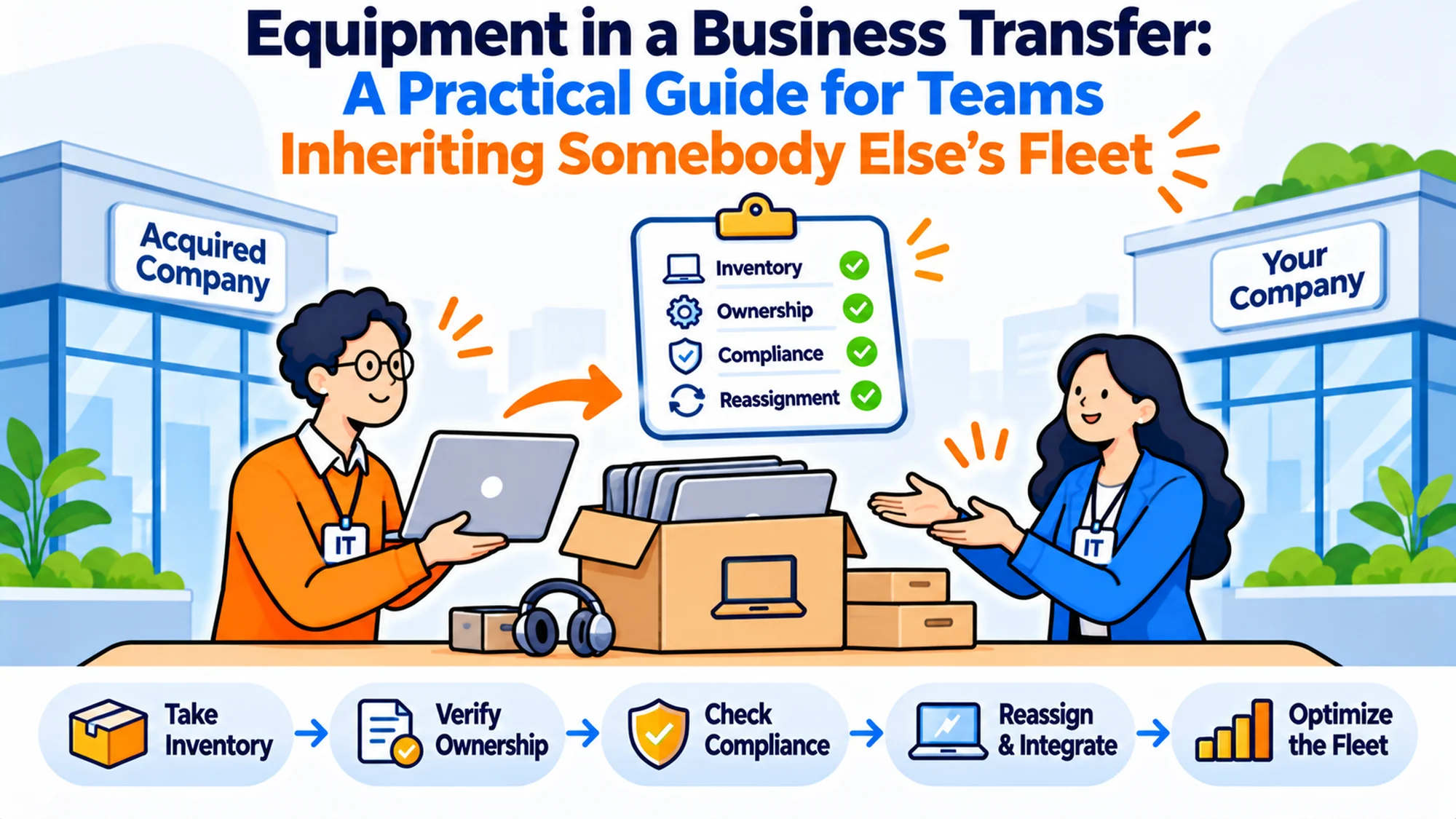
- Equipment in a business transfer is the question of what happens to laptops and devices when a group of people moves between employers.
- If the deal is an asset purchase where you buy the hardware too, most of this resolves itself on completion.
- It does three jobs: it stops people arriving on day one with no working machine, it establishes what you now own, and it closes the data question.
- What transfers, on what terms, and what anybody is entitled to differs by jurisdiction and by the specific arrangement, so that needs local advice every time.
- Choose your approach based on whether the devices are in scope of the deal, not on how many people are moving.
- Done right, nobody notices a change on day one, which is the whole objective.
Forty-one people join on the first of the month from a business you've acquired. The deal covered the entity, the contracts and the customer relationships. Nobody mentioned laptops. Three days before completion somebody asks whether those people are keeping the machines they have, and the honest answer is that nobody knows, because the question was never in anybody's workstream.
These aren't edge cases. An acquisition of a small team usually leaves the hardware unresolved because the deal value is in something else entirely. An outsourcing arrangement moves people to a provider and nobody specifies whether the devices go with them. A share purchase leaves the entity intact, which means the hardware stays where it is and your asset register suddenly needs to absorb 41 machines nobody has ever seen.
Best tools for HR Operations
The real issue isn't who owns the laptops. It's that equipment sits between the deal team, the IT team and HR, and all three reasonably assume one of the others has it.
When You Don't Actually Need to Worry About This
Stage one: the deal already covers it. A straightforward asset purchase where the hardware is explicitly in scope and listed in a schedule resolves most of this on completion. You own what the schedule says, you inherit the register, and the remaining work is integration rather than negotiation.
Stage two: friction appears. Nobody has mentioned equipment and completion is weeks away. Nothing has gone wrong and the first thing that does will be somebody arriving without a working machine, which is both visible and avoidable.
Stage three: it becomes a liability. People are now employed by you, working on devices you don't own, managed by a company you've no relationship with, holding data that's now your responsibility. That situation is uncomfortable rather than dangerous on day one and gets worse every week it persists.
Stage four: the edge case. The transfer is from a provider who is itself unhappy about the arrangement, or across borders, or involves devices under a lease you aren't party to. That's where the hardware question genuinely becomes difficult and where it needs to have been raised early.
What HR Teams Actually Need Settled Before Day One
> "Will everybody have a working laptop?" > That's the only question that matters on day one and it should be answered weeks earlier. > Everything else can be resolved over months, but somebody arriving unable to work is the failure people remember.
> "Who owns these machines now?" > Check the deal documents rather than assuming, because the answer differs by deal structure. > A share purchase leaves ownership where it was; an asset purchase depends entirely on what was listed.
> "Who is managing them?" > Possibly nobody, possibly the previous employer, and the second is worse than the first. > Devices still enrolled in somebody else's management platform are devices somebody else can still act on.
> "What's on them?" > Company data from the previous business, which is now your problem and may include things you don't want. > This is the question that's never asked at completion and should be.
> "What happens to the people's own material?" > They have been using these machines for years and there will be personal material on them. > Any wipe or reimage needs to be announced with notice rather than performed overnight.
There's a sixth question that surfaces in month two and is worth settling early. What's the refresh position? You have inherited a fleet of unknown age on somebody else's replacement cycle, and the honest answer is frequently that a third of it is overdue, which is a budget conversation nobody has had.
The Four Scenarios and What Each One Costs
Hardware in scope, listed and transferred. What it is: the deal includes the devices, with a schedule. When it's right: the cleanest version, and worth pushing for during negotiation precisely because it removes this whole article. When it fails: when the schedule is wrong. Schedules are compiled from the seller's register, and if that register was inaccurate you've bought a list rather than a fleet, which surfaces at the first audit.
Share purchase, entity intact. What it is: you acquire the company, so the hardware stays where it is and comes with it. When it's right: automatically, in the sense that nothing needs to move. When it fails: on integration rather than ownership. The devices are managed by a platform with its own contracts, licences and administrators, and working out what you've inherited takes months.
People transfer, hardware does not. What it is: the people move to you and the devices stay with the previous employer. When it's right: outsourcing arrangements in reverse, or where the devices are leased or genuinely out of scope. When it fails: on day one, loudly. This scenario requires you to have equipped everybody in advance, and the lead time for 41 machines in several countries is longer than most deal timetables allow.
Ambiguous, which is the common one. What it is: nobody specified, completion is approaching, and both sides assume the other has it covered. When it's right: never, but it is where most transfers actually are. When it fails: everywhere. The cost isn't the hardware, it is that nobody can plan, and the resolution usually arrives too late to order anything.
I'd push hard for the first scenario during negotiation, because the cost of resolving it afterwards exceeds anything it could reasonably affect in the price.
| Scenario | Day one risk | Who owns it? | Integration effort | Worst surprise |
|---|---|---|---|---|
| In scope and listed | Low | You | Moderate | An inaccurate schedule |
| Share purchase | Low | The entity | High | Inherited platform contracts |
| People only | Very high | Previous employer | Low | Nobody can work on day one |
| Ambiguous | High | Unresolved | Unknown | Discovered at completion |
How to Choose What to Do: Five Questions
Is it in the deal documents? Read them rather than asking somebody who was in the room. Equipment is usually either listed in a schedule or absent entirely, and both answers are useful while an assumption is not.
How long until completion? This sets what's possible. Six weeks allows you to equip people if you've to; two weeks does not, in any market with a normal lead time, and that constraint should drive the conversation rather than being discovered by it.
How many people and where? Forty people in one office is a logistics exercise. Forty across nine countries is a procurement project with nine lead times, and that difference matters far more than the headcount ever will.
Who is managing the devices today? Find out specifically. A fleet enrolled in the seller's platform is a fleet somebody else can still wipe, and establishing whether that access has been removed is more urgent than the ownership question.
What's the data position? You're inheriting whatever is on those machines. Deciding what you want to keep, what you would rather not have, and who is responsible for the difference is a conversation for before completion.
Six Platforms Worth Knowing
RemoAsset Best for: equipping a transferring population quickly, across markets, when the hardware isn't coming with them. Why companies choose it: procurement and retrieval across 80+ countries with devices tracked through issue and return, which is the exact shape of the people-transfer scenario where 41 machines have to reach 41 addresses in several countries against a fixed completion date. Pricing is published, from $1,499 a year on the Subscription tier for companies with 50 to 5,000+ employees, including a 60 per cent reduction on retrieval charges. It's our own product, so weigh that accordingly. Where it struggles: no network discovery, and that limitation bites unusually hard here, because the single most useful thing in an inherited fleet would be the ability to find out what actually exists rather than what a schedule claims. No software licence management, which is a real gap when you've inherited somebody else's licensing. Only the Subscription tier publishes a figure, with pay-as-you-go quoted. It doesn't manage or enrol devices.
Workwize Best for: staging a large equipping exercise from held stock. Why companies choose it: its own warehouses, which shortens lead time when the date is fixed. Where it struggles: no published rate card, and the figures on its pricing page are savings claims rather than prices. The live domain is goworkwize.com.
Firstbase Best for: standing up a new population quickly. Why companies choose it: strong supply side, which is what a fixed completion date needs. Where it struggles: publishes nothing on price, and it is weaker as a record for hardware you inherited rather than bought.
GroWrk Best for: a transfer with an irregular country spread. Why companies choose it: flexible arrangement rather than a fixed package. Where it struggles: no rate card, and its pricing page runs a competitor cost estimator whose figures are its own estimates.
allwhere Best for: handing the equipping exercise to somebody else entirely. Why companies choose it: managed service, minimal internal lift during a period when internal attention is scarce. Where it struggles: publishes nothing, so comparison needs a conversation.
Deel IT Best for: transfers where you've no entity in the markets concerned. Why companies choose it: hardware alongside employment, which is frequently the exact combination a cross-border transfer needs. Where it struggles: weaker standalone, and no published pricing.
The Decision Table: Matching the Scenario to the Action
| Situation | Scale | Setup | Primary Pain | Recommended Starting Point |
|---|---|---|---|---|
| Hardware listed in the deal | Any | Schedule exists | Schedule accuracy | Audit against reality in week one |
| Share purchase | Any | Entity intact | Inherited platform | Map what you have before changing it |
| People only, 6 weeks plus | Any | Any | Procurement volume | Order now, RemoAsset or similar |
| People only, under 3 weeks | Any | Any | Lead time impossible | Escalate the date, or bridge with spares |
| Nobody has specified | Any | Pre-completion | Nobody can plan | Raise it this week, in writing |
| Devices under a lease | Any | Third party involved | Not your contract | Legal and advice before anything |
The fifth row is where most transfers sit three weeks before completion.
Working Backwards from Day One
The article says to work backwards from the date and then leaves the reader to do the arithmetic. Here it is, for a people-only transfer where you have to equip everybody.
| Working back from day one | What has to happen |
|---|---|
| Day minus 42 | Headcount, roles and delivery addresses confirmed |
| Day minus 40 | Specification agreed, quotes obtained per market |
| Day minus 35 | Order placed, which is the hard deadline |
| Day minus 21 | Enrolment and build tested on one machine |
| Day minus 14 | Addresses re-confirmed, because they go stale |
| Day minus 10 | Deliveries begin in the slowest markets |
| Day minus 3 | Bridge plan confirmed for anything that will not arrive |
| Day one | Working machines, or a stated plan for the exceptions |
The row that governs everything is day minus 35. In several markets a laptop ordered later than five weeks out will not arrive, and no amount of attention afterwards compresses it. Which means the procurement decision frequently has to be taken before the deal is certain, and somebody has to be willing to own that.
That is the genuinely difficult part of this and it is a commercial judgement rather than a logistics one. The options are to order early and accept the exposure if the deal changes, to negotiate the hardware into scope so the problem disappears, or to plan a bridge from the start. All three are reasonable. Discovering at day minus 10 that none of them was chosen is not.
Re-confirming addresses at day minus 14 looks fussy and is the single highest-yield row after the order date. People in a transferring population are unsettled, some move, and an address captured six weeks earlier by a company that is no longer their employer is the least reliable data in the whole exercise.
Day One Is the Only Deadline That Cannot Move
Everything else in this article can be resolved over months. This one cannot, and it is worth separating from the rest for that reason.
They remember it. A person who joins and can't work has a specific and memorable experience of your company, and it colours everything after. It's also the single most predictable failure in any transfer, because it depends entirely on lead times that were knowable weeks in advance. Nobody is surprised by how long it takes to ship a laptop except the people who didn't ask.
Work backwards. From the date, rather than forwards from the deal. If completion is on the first and you need machines in nine countries, the order has to be placed on a date you can calculate, and that date is frequently before the deal is signed. That's uncomfortable and it is the actual constraint, which means somebody has to be willing to commit to procurement on a deal that might still change.
Bridge it. The partial answer that works is to bridge rather than solve. Equip the people who genuinely can't work without a company machine, let the rest continue on whatever they have for a few weeks, and phase the remainder. That's a worse outcome than full readiness and a much better one than 41 people arriving without hardware, and it is available even on a short timetable.
Decide the bridge in advance rather than improvising it. Which roles can't start without a managed device, which can work temporarily on an inherited machine, and what the sequence is. Three lines, settled before completion, and it converts a crisis into a plan.
The Bridge Plan
The article mentions bridging twice without specifying it. Worth doing properly, because for most transfers this is what actually happens.
A bridge is the deliberate decision that some people start on hardware that is not ideal, for a known period, with a stated end. That is different from nobody having planned, even though it produces a similar-looking first week, and the difference is entirely in whether people were told.
Sort roles into three groups. Those who cannot start without a managed company device, usually because of the data they handle, and who must be equipped before day one whatever it costs. Those who can work temporarily on an inherited machine, which is most people where the devices came across. And those who can work on something borrowed from your existing spare pool for a few weeks.
Then tell them. Which group they are in, before day one rather than after. The single biggest improvement available here is not logistical, it is that somebody arriving on a borrowed machine who was told to expect that has a completely different experience from somebody who was not. Same hardware, same fortnight, entirely different impression of their new employer.
Put an end date on it and hold to it. A bridge with no date becomes the permanent arrangement, which is how companies end up two years later with a group of people on hardware nobody chose, outside the standard, that the register barely describes.
I've seen a bridge announced clearly work out better than a full equipping exercise that slipped by a week without anybody mentioning it.
The Management Platform Question Is More Urgent Than Ownership
Here is the thing that should be raised first and almost never is.
Think about who still holds the keys. If the transferring devices are enrolled in the previous employer's management platform, somebody outside your company retains the ability to act on machines your employees now use. That includes, in most platforms, the ability to wipe them remotely. Ownership is a question for lawyers over weeks; this is a question for the week of completion.
Establish three things specifically. Whether the devices are enrolled in a platform, whose platform it is, and who retains administrative access to it. The answers come from the seller's IT team rather than from the deal documents, which is why this needs a technical conversation rather than a legal one.
Then agree what happens to that enrolment and when. The clean answer is that devices are unenrolled and re-enrolled into your platform on a planned date with the people told in advance, and the practical answer is often that this takes weeks and runs in phases. Either way it should be a plan with dates rather than something nobody has raised.
The risk while it is unresolved is small in probability and large in consequence. Nobody expects a seller to wipe a fleet, and I have never seen it happen, but the exposure is that somebody could, and closing it is a conversation rather than a project.
Keep a note of when each device moved across. That record is worth having because the period between completion and re-enrolment is a window in which responsibility is genuinely ambiguous, and knowing exactly how long it lasted for each machine is the kind of detail that matters only once.
Licences Come Across Too, and Nobody Checks
The article has mentioned inherited licensing once in passing. It deserves more, because it is frequently the larger inherited cost.
Everybody is using software. That software is licensed to somebody. In a share purchase the agreements may come with the entity; in other structures they may not transfer at all, which means 41 people arrive on day one using tools they are no longer licensed for. That is a compliance question rather than a technical one, and it does not announce itself because the software keeps working.
Ask for the list early, alongside the hardware schedule. What is in use, how many seats, on what terms, and when each agreement renews. The renewal dates matter more than people expect, because an agreement renewing three weeks after completion is a decision you have to take before you understand what you have bought.
Expect duplication. It gets expensive in both directions. You will be paying for your own tools and the inherited ones for a period, which is a real cost, and consolidating too quickly removes something a team depends on before anybody has established what that is. A few months of duplication is usually the cheaper mistake.
And check the management platform licence specifically, since it is the one that governs whether you can do anything with the fleet at all. Inheriting devices enrolled in a platform whose licence does not transfer is the version of this problem that blocks everything else in the integration plan.
The Data You Have Just Inherited
Nobody asks this at completion and it is the question with the longest tail.
Those devices hold the previous business's material: customer records, contracts, correspondence, and whatever else accumulated over the years people were using them. Some of it is now yours and useful. Some of it relates to parts of the business you didn't acquire, or to people who didn't transfer, and you may have no basis for holding it at all.
Raise it before completion, because the seller is the only party who can tell you what's likely to be there, and after completion they have considerably less incentive to engage. What you want is a short statement of what the devices are expected to contain and an agreement about anything that shouldn't come across.
Plan the separation. Don't assume a wipe handles it. A full reimage destroys the useful material along with the rest, which is why teams defer it, and deferring it indefinitely is how a fleet stays unmanaged for a year. The sequence that works is to move what is needed into your systems, confirm it is there, then reimage on a date everybody knows about.
Give people notice about their own material too. These machines have been in daily use for years and will hold personal things, and a reimage announced the day before is a small avoidable unkindness during a period when people are already unsettled. Two weeks and a clear instruction about what to move is enough.
And decide who owns this piece of work. It sits between IT, HR and whoever ran the deal, which means it belongs to nobody by default and the default is what usually happens.
What to Tell the Transferring People
The operational sections above all assume a population that is being communicated with. They frequently are not, and equipment is one of the few concrete things anybody can tell them.
People in a transfer have a long list of uncertainties and most of them cannot be answered quickly. Whether they keep their laptop, whether it will be replaced, and whether their photographs will survive a reimage are all questions that can be answered, which makes them disproportionately valuable in a situation where most answers are not yet available.
Say four things, as early as you can. Whether they keep the machine they have, what will happen to it and roughly when, how much notice they will get before anything is reimaged, and who to ask. Four sentences, and they close most of the equipment anxiety in a population of any size.
Be honest where it is not settled. Somebody told that the hardware position is still being worked out and that they will hear by a stated date is in a better position than somebody told nothing, and considerably better than somebody told something that later changes. The stated date is the part that matters.
Then actually meet the date, including if the answer is still not known, in which case say so again with a new date. That sounds trivial and it is the thing that determines whether a transferring population arrives trusting their new employer or watching it.
Auditing an Inherited Fleet
You have a schedule or a register from the seller. Treat it as a claim rather than as a record.
Nobody reconciled it. Schedules are compiled under deal pressure from whatever system the seller had, and the accuracy of that system is entirely unknown to you. The common failures are machines listed that no longer exist, machines in use that were never listed, and holders recorded as people who left months ago. None of that is dishonesty; it is the normal condition of an asset register nobody had a reason to reconcile.
Sample rather than audit everything. Pick 20 entries at random and confirm each one directly with the person it names, which takes a couple of days and gives you an error rate. An error rate is worth far more than a full audit you never finish, because it tells you whether the register is usable, needs correcting, or needs rebuilding.
Expect the answer to be corrective rather than catastrophic. Most inherited registers are directionally right and specifically wrong, which means the fleet exists roughly as described and perhaps a fifth of the detail needs fixing. Budget a few weeks of somebody's time rather than a project.
Then decide the age question, which is the one with a cost attached. An inherited fleet sits on somebody else's refresh cycle and a meaningful share of it is usually overdue, so work out the age profile early and put the replacement cost in the integration budget rather than discovering it as unplanned spend in month four.
Where Jurisdiction Decides the Employment Side
This is the part that is not an equipment question and must not be answered as one.
Ask locally, every time. What transfers in a business transfer, on what terms, what happens to anybody's employment, what consultation or information obligations apply, and what anybody is entitled to as a result all differ by jurisdiction and by the specific arrangement. Those are questions for local advice in every market involved, taken before completion rather than after it. Nothing in this article addresses them and no equipment policy should attempt to.
The same applies to anything about the data you are inheriting, which sits alongside obligations that vary by place and by the kind of material involved. Raise it with advice rather than deciding internally what you may keep.
What is portable is the operational discipline, and it is most of what determines whether a transfer goes smoothly. Work backwards from day one. Settle the management platform question in the week of completion. Agree the data position before completion. Sample the inherited register rather than trusting it. Name one person who owns the equipment workstream from the point the deal becomes likely rather than from completion. None of that needs advice and all of it is routinely skipped.
The division is the same as everywhere else in this area, and it is worth stating plainly rather than leaving implied. The employment and data obligations are somebody local's answer, every time. The logistics, the sequencing and the record are yours, and they are the parts that fail.
Name One Owner for the Equipment Workstream
A short section, because this is the structural cause of almost everything above.
Four workstreams, no owner. A transfer has a deal team, a legal workstream, an HR workstream and an IT integration plan. Equipment touches all four and belongs to none, which means the question gets asked late by whoever happens to think of it. That is not a process failure, it is an organisational gap, and naming somebody closes it.
Give them a narrow brief. Establish what the deal says about hardware, confirm the management platform position, work backwards from day one to a procurement date, and keep a list of what was inherited. Four things, one person, from the point the deal becomes likely rather than from completion.
Put them in the room early. The most valuable thing an equipment owner does is ask about hardware during negotiation, when it can still be put in scope and when the cost of resolving it is a line in a schedule rather than a procurement scramble.
And keep them after completion. Integration is where the inherited register, the refresh cliff and the platform migration all land, and handing those to whoever is available produces three partial efforts rather than one finished one.
The Three-Week Transfer
Worth addressing directly, because it is common and the article so far assumes six weeks.
Sometimes you find out late. The deal moves faster than expected, or the equipment question genuinely was not asked until completion was three weeks away, and the day minus 35 order date has already passed. At that point the full version of this is unavailable and pretending otherwise wastes the time you have.
Do three things. Establish which roles cannot start without a managed device and equip only those, by whatever expedited route exists, accepting the premium. Confirm that the inherited machines will keep working on day one, which usually means establishing that nobody is about to unenrol them. And tell everybody, before they arrive, what the arrangement is and when it changes.
That produces a transfer where most people continue on hardware you do not own for a few weeks, which is not ideal and is entirely workable. The exposure is the unmanaged period, so put a date on ending it and treat that date as seriously as the completion date itself.
What not to do is order everything at a rush premium to arrive in week two. It feels decisive and it buys very little, because the people are already working by then and the money would have been better spent on the slower, cheaper order plus a clear communication.
The lesson for next time is the only durable output. Put the equipment question on the deal checklist at the point a transaction becomes likely, because the thing that made this expensive was timing rather than anything about the hardware.
The Cost of Getting This Wrong
The direct cost is procurement you did not plan for, which is annoying and quantifiable. Equipping 41 people at short notice costs real money and some of it is avoidable premium for speed.
What is expensive is day one. People joining a new employer and finding they cannot work form a view that is slow to change, and in a transfer the population forming that view is a whole team at once rather than an individual. I have watched a deal where everything substantive went well and the thing people talked about for a year was the fortnight they spent without working laptops.
The second cost is the unmanaged period. A fleet nobody has enrolled, holding data nobody has assessed, with administrative access possibly still held elsewhere, is an exposure that persists for as long as the question is unresolved. It is nobody's emergency, which is exactly why it lasts.
Third is the refresh cliff. An inherited fleet on somebody else's cycle usually contains a significant share of machines already overdue for replacement, and discovering that in month four produces unplanned spend at the worst point in an integration budget.
So the question is not who owns the laptops. It is whether anybody in the transfer has been asked to work backwards from day one, and whether the management platform position is settled.
When You're Ready to Move Beyond Hoping It Resolves Itself
You will know when completion is three weeks away and the equipment question appears in a meeting for the first time. That pattern repeats across deals because nothing in the process generates the question earlier.
What fixes it is one named owner with a four-item brief, asked to start when the deal becomes likely. Everything else in this article is what that person does, and none of it is difficult once somebody is responsible for it.
RemoAsset is our own product, so weigh this accordingly. The scenario it addresses is the hardest one here: people transferring without hardware, across several markets, against a fixed date, where procurement and delivery to many addresses is the whole problem. It has no network discovery, which is genuinely the wrong limitation to have when auditing an inherited fleet, and it manages nothing.
If a transfer is coming and nobody owns the equipment question, that is the thing to fix this week.
Frequently Asked Questions
What happens to laptops in a business transfer?
It depends on the structure. Which is why reading the documents beats asking somebody who was in the room when they were drafted. A share purchase leaves the hardware with the entity, an asset purchase depends entirely on whether devices were listed in a schedule, and an arrangement where only people move means you have to equip everybody yourself. The common situation is that nobody specified, which is the one that causes the trouble.
What is the most urgent thing to settle?
Whether everybody will have a working machine on day one, because that is the only deadline that cannot move. Work backwards from the completion date to a procurement date, which in several markets is earlier than the deal is likely to be signed, and decide in advance which roles genuinely cannot start without a managed device so the rest can be phased.
Why does the management platform matter more than ownership?
Somebody else holds the keys. Devices still enrolled in the previous employer's platform mean a party outside your company can still act on machines your employees now use, including in most cases a remote wipe. Ownership is a question for lawyers over weeks; enrolment is a question for the week of completion. Establish whose platform it is and who holds administrative access, from the seller's IT team rather than from the deal documents.
Can we trust the asset schedule we were given?
Treat it as a claim rather than a record. Schedules are compiled under deal pressure from a register nobody had reason to reconcile, so expect machines listed that no longer exist, machines in use that were never listed, and holders who left months ago. Sample twenty entries and confirm them directly to get an error rate, which is worth more than a full audit you never complete.
What about the data on the inherited devices?
Raise it before completion. The seller is the only party who can say what is likely to be there, and their incentive to engage drops sharply afterwards. Some of it will be material you need, some will relate to parts of the business you did not acquire, and deciding what you may hold is a question for advice rather than an internal judgement. Plan a sequence of moving what is needed, confirming it, then reimaging.
How much notice should people get before a reimage?
About two weeks. With a clear instruction about what to move. These machines have been in daily use for years and will hold personal material, and a reimage announced the day before is an avoidable unkindness during a period when people are already unsettled. It also produces better results, because people move what matters when they have time to.
What about the refresh position on an inherited fleet?
Check the ages early. An inherited fleet sits on somebody else's replacement cycle and a meaningful share of it is usually already overdue. That is a real cost and it belongs in the integration budget rather than arriving as unplanned spend in month four. It is also one of the easier things to establish, since age is usually the one field an inherited register gets right.
Who should own the equipment question in a transfer?
One named person. Briefed narrowly, and involved from the point the deal becomes likely rather than from completion. Equipment touches the deal team, legal, HR and IT integration and belongs to none of them, so without an owner it gets raised late by whoever happens to think of it. Their most valuable contribution is asking about hardware during negotiation, when it can still be brought into scope cheaply.
Equip a transferring team across every market, against a date that cannot move.