TL;DR
- Core decision: Should you stay with Connecteam or move to a tool that handles your specific operational shape better?
- Stay put when: Mobile and field scheduling is doing its job, and the pain is friction, not failure.
- What it must do: Track time accurately, apply overtime and break rules without manual arithmetic, and survive last-minute shift changes.
- How the market splits: Field and construction, hospitality, and enterprise with complex compliance.
- Decision rule: Route by the workflow that hurts most, not by feature checklist.
- Outcome to expect: A clearer shortlist, a defensible choice, and fewer Sunday-night roster rebuilds.
| Tool | Rating | Pricing | Trial | Best for |
|---|---|---|---|---|
| Connecteam (your current tool) | 4.6/5 | From $29/month (up to 30) | Free plan available | Best scheduling for deskless and field workers |
| Deputy | 4.7/5 | From $4.50/user/month | Free trial available | Best all-in-one scheduling and time tracking platform |
| 7shifts | 4.6/5 | From $29.99/month | Free plan available | Best scheduling software for restaurants |
| When I Work | 4.5/5 | From $2.50/user/month | Free plan available | Best for retail and hospitality shift management |
| Homebase | 4.5/5 | Free / From $20/month | Free plan available | Best free scheduling software for small businesses |
| Sling | 4.3/5 | From $2/user/month | Free plan available | Best affordable scheduling for shift-based teams |
| ClockShark | 4.4/5 | From $16/month + $8/user | Free 14-day trial | Best scheduling for construction and field service |
| Shiftboard | 4.3/5 | Pricing on request | Free demo available | Best enterprise scheduling for complex workforces |
| Quinyx | 4.4/5 | Pricing on request | Free demo available | Best WFM and scheduling for European businesses |
| Workforce.com | 4.2/5 | Pricing on request | Free demo available | Best scheduling with advanced labour analytics |
The Roster That Refused to Sit Still
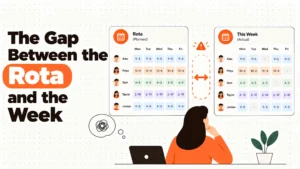
A multi-site cleaning contractor in the South East had run the week for two years. The manager had a 4.6-star review pinned to her monitor. Then a supervisor in one branch quietly shifted three people across days to cover a VIP contract. The payroll export caught it. The wage bill that week came in £800 over forecast. The reconciliation took a full day.
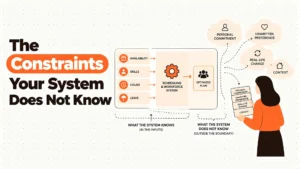
She didn't need a new tool. She needed to know whether the tool was the source of the error or merely the messenger. That's the actual question most operators face. Switching costs money, switching disrupts a working rhythm, and the new tool inherits the same operational dysfunction unless somebody changes the process behind it.
The real issue isn't which platform is on top of a ten-tool ranking. It's whether the work the platform does for you, in your specific jurisdiction, in your specific industry, matches the way you actually roster people and the cost profile of your labour.
Best tools for Employee Scheduling
When Connecteam Is Still the Right Answer
Stay if your setup is genuinely fine. If you run a deskless crew between 10 and 1,000 people, if the GPS clock-in has cut the buddy-punching problem, if your managers can build a week on a phone from a job site, and if payroll closes without surprises, you don't have a tool problem. You have a habit problem, and the fix is process, not procurement.
Look for cost friction next. The $29/month entry price is real, and it stays friendly as you add seats. When the bill starts to feel heavy, ask whether you're paying for modules you don't use. The honest answer for many buyers is yes.
Then comes real risk. The features that matter most for compliance, advanced reporting, granular role permissions, deeper payroll integration, live this month are the ones that sit above the entry tier. If you're growing into them, the total cost curve is what you should be modelling, not the headline price.
Finally, the edge case. If your operation is moving away from field and mobile work and into more office-based or knowledge work, the mobile-first design that made Connecteam a fit becomes a constraint. The best tool for the next 18 months is rarely the best tool for the one after that.
Five Questions You Ask Yourself at 11pm
Is my overtime arithmetic actually correct? It matters because the answer decides whether the tool is doing your compliance work for you or quietly leaving you exposed. The exposure isn't a number on screen, it's a liability that compounds across weeks.
What happens when a shift changes at 6pm the day before? Predictive scheduling rules in places like Oregon, Seattle, San Francisco, New York City, Chicago and Philadelphia require advance notice and pay a penalty when a posted shift moves late. A tool that reissues a shift without surfacing the cost of doing so isn't helping you, it's hiding the bill. The shape of that exposure varies by jurisdiction. Take local advice before you trust the dashboard.
Can my least technical manager publish a week without calling me? If the answer is no, you're paying for a tool that needs a translator. The cost of the translator is paid in your evenings.
Does the time clock survive poor signal on a job site? Mobile workers don't work in cafés. Offline punches, queued sync, and reliable GPS stamps at low signal are the difference between an honest timesheet and a reconstruction exercise on Monday morning.
Can I prove a wage dispute in two minutes, not two days? Audit trail depth is what you only learn you needed once. The export that takes 90 seconds when the tribunal letter arrives is worth more than any feature on the sales page.
How This Market Actually Splits
Field and construction. These tools treat the job site as the source of truth. GPS, geofencing, and job costing drive the design. They fail when you try to use them in a tidy office where half your team works fixed hours. The field-first DNA shows up as friction in a call centre.
Hospitality and restaurant. Schedules here are built around service periods, tip rules, and POS-driven labour targets. The kitchen and the floor are different worlds inside one venue, and the right tool respects that split. The failure mode is trying to use it for a cleaning company. The workflows don't line up.
Enterprise with complex compliance. Multi-site, multi-rule, certification-tracked, and Works Council aware. The tools are heavier, the prices are quoted not published, and the implementation is a project, not a sign-up. They fail when a 12-person team buys them for the badge value and never configures the rule engine.
Five Diagnostic Questions for You
Do more than 40% of your employees clock in away from a fixed address? If yes, GPS-native tracking isn't a nice-to-have. It's the only way the time clock is honest.
Do you operate in a jurisdiction with predictive scheduling rules? If you do, your tool has to surface the cost of every shift change. Otherwise you're finding out about penalties from your finance team.
Is the answer to "who owes me overtime this week" a query, or a spreadsheet? A query means the tool is doing the work. A spreadsheet means you're paying twice, once for the licence and once for the human calculation.
How many managers publish rosters, and what is the least trained among them? Tool choice should be made for the weakest user, not the most capable.
When someone calls in sick at 6am, how long until coverage is found? The honest answer, in minutes, is the real test of any shift platform. Not the demo. Tuesday morning, six minutes in.
The Nine Alternatives, Reviewed
Deputy
Deputy earns the top slot for good reason. The smart auto-scheduling, the facial recognition clock, and the live labour cost dashboard form a coherent package that scales from ten employees to tens of thousands. It's at its best in mid-size operations where multiple sites need consistent rule application and where managers publish rotas weekly. The real weakness shows on the higher tiers, where the advanced reporting and analytics that justify the price for enterprise buyers sit behind a paywall that smaller teams can't justify.
7shifts
7shifts is the most food-service-aware tool on this list, and the POS integration that lets you schedule to a labour cost percentage of sales is a genuine advantage in restaurants. Tip pooling, FOH and BOH separation, and shift templates built around service periods are the work the rest of the market fudges. The honest weakness is that a cleaning company or a manufacturer should not buy 7shifts. The workflows are different, the integrations don't line up, and you'll feel the mismatch in week two.
When I Work
When I Work wins on price and on the experience of the person using it. One-click templates, employee-led swaps, and a clean mobile interface make it a default for small retail and hospitality teams. The ceiling arrives when reporting depth, payroll integration, and configuration control start to matter. If you're growing past 200 employees, the tool feels like it's asking you to do more with less.
Homebase
Homebase is the most generous free tier in the category and a sensible starting point for a single-location small business. Scheduling, time clock, and team messaging are all there, with no time limit and no employee cap. The moment a second location opens, the bill starts and the feature set narrows. Treat the free plan as a long trial, not a permanent home.
Sling
Sling is clean, cheap, and does the core scheduling job without ornament. The labour cost alerts are useful for managers who have never had them, and the interface is friendly. The weakness is depth. Time tracking is competent rather than forensic, and the integration catalogue on the free plan is thin. For a small team that wants clarity over capability, Sling is a strong answer.
ClockShark
ClockShark is the right answer for construction and field service teams that need job site geofencing, project cost codes, and crew-level scheduling. The GPS layer is the strongest in the category, and the job costing data flows into project profitability in a way that generalist tools can't match. The honest weakness is that it isn't built for office, retail, or hospitality. The interface reflects the job site, and that's exactly what you don't want in a contact centre.
Shiftboard
Shiftboard is enterprise software for organisations with complex skills matrices, certification tracking, and multi-site rule sets. The strengths are the skills-based shift matching and the centralised view across unlimited locations. The weaknesses are the cost, the implementation timeline, and the fact that it's overkill for almost any company under 200 employees. Buy it because you need it, not because the demo was impressive.
Quinyx
Quinyx is the European answer to enterprise workforce management, with AI demand forecasting, Works Council reporting, and GDPR-native data handling built in. If you operate across multiple EU jurisdictions and need scheduling that respects local labour law, the case is strong. Outside Scandinavia and Western Europe, the partner network is thinner, and the localisation of support can be a friction point.
Workforce.com
Workforce.com is at its best when scheduling is the front end of a labour analytics question. Revenue per labour hour, schedule adherence, and overtime analysis by site and manager are the features that justify the conversation. The honest weakness is the user interface, which is functional rather than elegant, and the pricing model, which is opaque until a sales call.
The Decision Table
| Situation | Scale | Setup | Primary Pain | Recommended Starting Point |
|---|---|---|---|---|
| Field and construction crews, job costing matters | 5 to 500 | Multi-site, mobile | Hours not tied to projects, payroll reconciliation | ClockShark |
| Single restaurant or small hospitality group | 10 to 150 | One venue, FOH and BOH | Tip pooling, labour cost vs sales, manager hours | 7shifts |
| Small retail or hospitality, price sensitive | 10 to 50 | One or two sites | Manager time spent scheduling, last-minute swaps | Homebase (free) or When I Work |
| Multi-site mid-market with mixed hourly and salaried | 100 to 1,000 | Several sites, central oversight | Schedule consistency, overtime control, reporting | Deputy |
| Enterprise with certification tracking and Works Councils | 500 to 50,000 | Multi-country, regulated industries | Skills matching, compliance audit, multi-site rules | Shiftboard or Quinyx |
| Cleaning, security, home services, growing fast | 30 to 500 | Mobile workforce, GPS critical | Buddy punching, off-site clock-ins, audit trail | Connecteam or Deputy |
| Multi-site retail, analytics-driven | 100 to 5,000 | Multi-site, POS integrated | Labour cost visibility, demand-based scheduling | Workforce.com |
| European retail or logistics, GDPR-native | 200 to 5,000 | EU operating, council engagement | Local labour law, demand forecasting, consent | Quinyx |
The Cost of Getting This Wrong
The licence fee is the smallest part of the bill. The cost you'll actually feel is the one that shows up in the wage line four weeks after the switch, when the overtime thresholds were not configured the way your operations team assumed, and a department of 40 staff quietly accrued an extra two hours each. Predictability penalties in jurisdictions that enforce them aren't abstract. They're line items, sometimes per affected shift, sometimes per affected employee, and they're payable by the employer, not the software vendor.
The second cost is the manager who rebuilds rosters by hand every week because the tool they were sold doesn't match the way their team actually works. That cost is paid in the manager's evenings, in their family time, and in the turnover that follows when a good manager gets tired of doing the tool's job for it. The third cost is the one that never appears on a dashboard, which is the slow erosion of trust between the head office and the site, because the schedule keeps changing and nobody can say why.
So the question worth asking, before you sign a single contract, is which cost your operation is currently paying, and which tool will stop charging it.
When You Are Ready to Move Beyond a Basic Setup
Most readers of this piece won't need enterprise software, and the right move is often a tighter configuration of what they already have, a process review with their operations lead, and a clearer decision on which features they will actually use versus which ones are sold to them every renewal cycle.
HROpsLab publishes independent comparisons of workforce management software because the market rewards confident marketing over honest reporting, and operators deserve a counterweight. We don't sell software. We don't take referral fees from the vendors we review. We make our money from readers who trust the work, and we protect that trust by telling you when a tool is wrong for you, including the ones we've ranked highly. If you're weighing a switch and want a second opinion grounded in the specific shape of your operation, the next step is a short conversation with one of our analysts.
Frequently Asked Questions
Is Connecteam still worth using in 2026?
Yes, for deskless and field teams between 10 and 1,000 staff, especially where mobile-first scheduling, GPS clock-in, and in-app training are the primary needs. The $29/month entry price remains friendly as you scale, and the field-first design is hard to replicate in generalist tools. The honest ceiling is reached when advanced reporting, deeper payroll integration, or non-mobile workflows become important.
What is the cheapest Connecteam alternative that still does the job?
Sling at $2/user/month and When I Work at $2.50/user/month are the lowest published entry prices in the category and both cover the core scheduling and time tracking needs. Homebase goes further with a genuinely free plan for a single location. The cheapest option is only right when the operational requirements are simple. If overtime control, certification tracking, or multi-site rules matter, the price gap closes once you upgrade.
Which Connecteam alternative is best for restaurants?
7shifts. The food-service design is visible in the FOH and BOH scheduling separation, the POS integration with Toast, Square and Clover, and the tip pooling and tip credit calculations. The weakness of buying 7shifts is showing up if your operation isn't a restaurant. Match the tool to the workflow.
Which alternative handles predictive scheduling compliance best?
Tools like Deputy, Shiftboard, and Quinyx are designed to surface the cost of shift changes and to apply local rule sets. None of them substitute for legal advice in your jurisdiction, and predictive scheduling rules vary materially between places like Oregon, Seattle, San Francisco, New York City, Chicago and Philadelphia. The right tool tells you when a change is going to cost you. The right lawyer tells you whether the change is allowed.
Can I switch from Connecteam without losing my schedule history?
Most tools offer CSV import of employees, roles, and historical shifts, and the migration is typically a one to two week project for a mid-size operation. The harder part is retraining managers and configuring the rule engine, not the data transfer. Plan a parallel run of at least two pay cycles before you cut over.
Which option is best for a European business with Works Council obligations?
Quinyx. The GDPR-native data handling, EU data residency, and Works Council reporting are built into the product rather than bolted on. Deputy and Shiftboard also serve European enterprises well, particularly in the UK and DACH regions, but Quinyx is the most European-first of the three.
Do any of these alternatives have a genuinely free plan?
Homebase. Scheduling, time clock, and team messaging for unlimited employees at one location, with no time limit. It's the most generous free tier in the workforce management category and a sensible starting point for a single-location small business.
How do I avoid paying for features I will never use?
Map your top three operational pains before you talk to any vendor, and disqualify tools that don't address at least two of them. Entry-tier pricing is a real number, but the plan you actually use twelve months in is rarely the plan you bought on day one. Model the twelve-month cost, not the headline price.
Trust the work. The tool is the messenger. The operation is the message.