TL;DR
- Core decision: Workforce.com is a serious scheduling and labour analytics platform, but its pricing is opaque and its UI lags Deputy and 7shifts, so most evaluations come down to whether the analytics depth is worth the sales-call procurement.
- Stay put if: You're already using the advanced labour analytics layer against POS data, you're between 100 and 5,000 hourly staff, and the absence of a clean self-serve price is annoying rather than blocking.
- What a scheduling tool must do: Generate a compliant schedule, clock people in with verified identity and location, flag overtime and breaks as the roster is built, and feed accurate hours into payroll without a manual export.
- How the market splits: Specialist (7shifts, ClockShark), all-rounder (Deputy, When I Work, Homebase, Sling, Connecteam), and enterprise with compliance depth (Shiftboard, Quinyx).
- Decision rule: If your exposure is a single restaurant, store, or job site, go specialist or all-rounder. If your exposure is a labour council, multi-jurisdiction predictive scheduling, or shift certification, go enterprise.
- Expected outcome: A tool that the floor manager actually uses on a Tuesday at 7am, payroll that reconciles on the first run, and a defensible audit trail when a regulator asks for last month's roster.
| Tool | Rating | Pricing | Trial | Best for |
|---|---|---|---|---|
| Workforce.com (your current tool) | 4.2/5 | Pricing on request | Free demo available | Best scheduling with advanced labour analytics |
| Deputy | 4.7/5 | From $4.50/user/month | Free trial available | Best all-in-one scheduling and time tracking platform |
| 7shifts | 4.6/5 | From $29.99/month | Free plan available | Best scheduling software for restaurants |
| When I Work | 4.5/5 | From $2.50/user/month | Free plan available | Best for retail and hospitality shift management |
| Homebase | 4.5/5 | Free / From $20/month | Free plan available | Best free scheduling software for small businesses |
| Connecteam | 4.6/5 | From $29/month (up to 30) | Free plan available | Best scheduling for deskless and field workers |
| Sling | 4.3/5 | From $2/user/month | Free plan available | Best affordable scheduling for shift-based teams |
| ClockShark | 4.4/5 | From $16/month + $8/user | Free 14-day trial | Best scheduling for construction and field service |
| Shiftboard | 4.3/5 | Pricing on request | Free demo available | Best enterprise scheduling for complex workforces |
| Quinyx | 4.4/5 | Pricing on request | Free demo available | Best WFM and scheduling for European businesses |
The 9pm Roster Problem
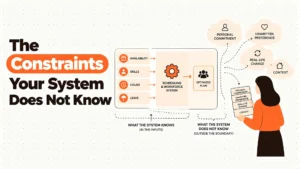
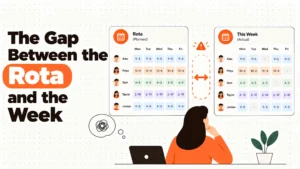
It's a Tuesday. Your assistant manager has just texted that the closing barista called in sick. You pull up the roster on your phone, find a trained cover, and message them. Then you remember: predictive scheduling rules in your city require a defined notice window before a posted shift moves, and a pay penalty when it does. You're not sure which rule applies to a voluntary swap, and you're not sure whether the tool you're using logged this as a change at all. The real issue isn't the empty shift. It's whether your system treats the schedule as a living compliance document or as a poster on the wall.
This is the decision in front of you. Workforce.com does the analytics job well, and the labour cost layer is genuinely stronger than most of the category. The question is whether that's enough to justify opaque pricing, a UI your managers tolerate rather than enjoy, and the work of stitching together the things it doesn't specialise in: tip pooling, deep restaurant workflows, GPS for field crews, or European works council reporting.
When Workforce.com Is Still the Right Answer
There are four honest stages here. Stage one is the obvious one: you're between 100 and 5,000 hourly staff across multi-site retail, hospitality, or healthcare, you've already wired the labour analytics layer into your POS, and the reports your operations team runs on revenue per labour hour are the basis of scheduling decisions. In that case, the cost of switching is real, and the value of what you've is concrete. Stay.
Best tools for Employee Scheduling
Stage two is cost friction only. You're not unhappy with the product. You're unhappy that you can't see a price without booking a call, and procurement is asking you to justify a number you don't have. Push the vendor for a written quote at your actual headcount. If the number is bearable and the renewal lands without a 30% jump, this is a procurement irritation, not a strategic problem.
Stage three is real risk. The UI is dragging manager adoption down, your most senior store manager has stopped using the analytics tab, and the schedule changes your team are making after publication are no longer being captured in a way that would survive a regulator's request. This is the stage where switching has a business case beyond price.
Stage four is the edge case. You have a single restaurant group, a construction operation, or a European retail footprint, and Workforce.com's generalist positioning is the wrong fit. The product will still work, but a specialist will do the actual job better for less effort. Move.
Five Questions You Are Asking at 11pm
Does this tool handle overtime correctly when I am building the schedule, or does it tell me after the pay run? It matters because overtime is arithmetic the tool either performs while you build, or it silently leaves you exposed. Workforce.com flags overtime in the analytics layer; Deputy and Sling flag it in the build view. That difference shows up in the pay run.
What happens when a shift changes four hours before it starts? It matters because predictive scheduling rules in places such as Oregon, Seattle, San Francisco, New York City, Chicago and Philadelphia require advance notice and a pay penalty when a posted shift changes late. A tool that logs the original shift, the change, the reason, and the affected employee builds you an audit trail. A tool that lets a manager edit the schedule without a record doesn't. Get local advice on the exact rules that apply to you.
Can the floor manager actually use it on a phone at 6am? It matters because scheduling software is adopted by the person who has to use it on a Tuesday, not the person who bought it. Deputy, When I Work, Homebase, and Connecteam have invested visibly in mobile. Workforce.com is functional here, not best in class.
Will payroll reconcile on the first run? It matters because the hidden cost of any scheduling tool is the manager who spends Friday afternoon reconciling exports. Deputy, Homebase, and Connecteam have native payroll integrations. Workforce.com integrates but the quality of the integration depends on the payroll provider.
What does it cost at my actual headcount, written down? It matters because the alternative to a published price is a sales process. For Workforce.com, Shiftboard, and Quinyx, you'll need a call. For Deputy, 7shifts, When I Work, Homebase, Connecteam, Sling, and ClockShark, the answer is on the website.
Three Categories This Market Splits Into
Specialist tools. Built for one industry, deeply. 7shifts knows restaurant tip credit and FOH/BOH workflows. ClockShark knows job costing and geofenced crew clocks. The right pick when your business is the industry the tool was built for, and a poor pick the moment you ask it to do something outside that lane. A 7shifts deployment in a cleaning company is a square peg.
All-rounders. Scheduling, time, attendance, mobile, and basic analytics in one product, priced for hourly teams of any size. Deputy, When I Work, Homebase, Sling, and Connecteam sit here. They're right for the operations manager who wants one tool that the team will actually use. They fail when the workforce gets complex enough that skills, certifications, and multi-site rule sets start to matter more than the price per user.
Enterprise with compliance depth. Built for organisations whose scheduling risk is a regulator, a works council, or a missed certification. Shiftboard and Quinyx sit here. The right pick when an audit finding would be worse than the licence fee, and a bad pick when you're a 40-person operation paying enterprise prices for capabilities you'll never configure.
Five Diagnostic Questions
How many distinct sites does the schedule touch? If the answer is one, the all-rounder tier is almost always right. If it's between two and ten, you want multi-site visibility but not enterprise complexity. If it's more than ten with regional rule sets, the enterprise tier earns its keep.
Do your managers currently use the analytics tab, or only the schedule grid? If only the grid, you're paying for capability you've not adopted, and the case for switching is partly about getting your money's worth elsewhere.
Are predictive scheduling rules, multi-jurisdiction overtime, or works council reporting part of your exposure? If yes, the decision isn't a pricing decision. It's a compliance decision. Pick the tool that logs what the regulator will ask for.
What is your manager-to-employee ratio, and how do they communicate shift changes today? This tells you whether the mobile experience or the manager dashboard is the real adoption battle. It also tells you whether the swap-and-cover workflow is saving you hours or costing you them.
Can you name the payroll system and the POS system the new tool has to talk to? This filters the shortlist faster than any feature comparison. Deputy, Homebase, and Connecteam have broad integration lists. Specialist tools go deep on their own industry's POS, weakly on others.
The Nine Alternatives, Reviewed
Deputy
Best for the operations leader who wants one platform for scheduling, time, attendance, and payroll integration. Deputy earns its place with smart auto-scheduling against availability and skills, facial recognition clock-in on any tablet, and a real-time labour cost dashboard that updates as you build. It struggles on price at scale, and the deeper reporting sits behind the upper tiers.
7shifts
Best for restaurant operators who live and die by tip credit, FOH/BOH staffing, and labour cost as a percentage of sales. 7shifts earns its place with restaurant-specific scheduling views, POS integration with Toast, Square, and Clover, and configurable tip pooling. It struggles outside hospitality, and its analytics are gated to higher plans.
When I Work
Best for the small retail or hospitality team that wants to stop using spreadsheets without adding procurement overhead. When I Work earns its place with one-click schedule templates, employee-driven shift swaps, and a mobile clock with GPS. It struggles on payroll integration at the base plan, and reporting is shallower than Deputy.
Homebase
Best for the single-location small business that doesn't want to pay anything yet. Homebase earns its place with a genuinely free plan covering unlimited employees at one location, a clean drag-and-drop scheduler, and a team messaging tool that replaces the WhatsApp group. It struggles the moment a second location appears, and advanced HR features are thin.
Connecteam
Best for deskless and field workforces, from cleaning crews to security to home services. Connecteam earns its place with GPS-verified clock-ins, geofenced early clock-in prevention, and in-app training with quiz tracking. It struggles on some of the deeper enterprise scheduling features, and the mobile-first design is less useful in a corporate environment.
Sling
Best for the budget-conscious shift team that wants labour cost visibility without enterprise pricing. Sling earns its place with a clean visual scheduler, real-time labour cost tracking, and overtime alerts during the build, starting from $2 per user per month. It struggles on time tracking depth, and integrations are limited on the free plan.
ClockShark
Best for construction, field service, and trade businesses tracking time against job sites and cost codes. ClockShark earns its place with GPS clock-ins tied to specific locations, job costing that feeds profitability analysis, and crew scheduling with skill matching. It struggles outside field environments, and the mobile app needs decent connectivity.
Shiftboard
Best for the enterprise with complex multi-site scheduling, skills-based assignment, and certification expiry risk. Shiftboard earns its place with skills-based shift matching, centralised multi-site management, and certification tracking with renewal workflows. It struggles on price, and implementation needs dedicated setup time you should budget for.
Quinyx
Best for the European mid-to-large operation whose exposure is GDPR, works councils, and AI-driven demand forecasting. Quinyx earns its place with machine-learning demand forecasts, an optimisation engine that balances compliance and cost, and EU-native data handling. It struggles outside Scandinavia and Western Europe, and the price requires a conversation.
The Decision Table
| Situation | Scale | Setup | Primary Pain | Recommended Starting Point |
|---|---|---|---|---|
| Single restaurant, bar, or cafe | 10 – 80 staff | One location, one POS | Tip pooling and labour cost as a percent of sales | 7shifts |
| Multi-site restaurant group | 50 – 500 staff | 2-15 locations, Toast or Square | Consistency of scheduling and tip rules across sites | 7shifts or Deputy |
| Single retail or hospitality site, under 30 staff | Under 30 | One location, basic POS | Cost, and replacing WhatsApp with a real tool | Homebase |
| Mid-size retail or hospitality chain | 30 – 500 | 2-20 locations | Manager adoption, mobile experience, payroll integration | Deputy or When I Work |
| Field service, cleaning, security, construction | 10 – 500 | Mobile crews, multiple job sites | GPS-verified time and job costing | Connecteam or ClockShark |
| European retail or hospitality, 200+ staff | 200 – 5,000 | Multi-country, works council exposure | GDPR, demand forecasting, compliance documentation | Quinyx |
| Enterprise with complex multi-site scheduling and certification risk | 200 – 10,000 | Multi-site, regulated environment | Skills matching, certification expiry, audit trail | Shiftboard |
| Workforce.com user with UI and procurement friction only | 100 – 5,000 | Already wired to POS analytics | Pricing opacity, manager adoption | Stay, or move to Deputy if renewal lands poorly |
The Cost of Getting This Wrong
The licence fee is the smallest line on the bill. The real costs sit two layers down, in the things you notice at month end or when a regulator calls. A posted shift that changes two hours before start, in a city with a predictive scheduling ordinance, is a pay penalty. Unplanned overtime that the schedule builder didn't flag becomes a budget conversation with finance. A manager who rebuilds the week by hand every Sunday because the tool is too slow on mobile is a hidden salary cost. And erratic shifts, the kind that come from a tool the floor doesn't trust, are a turnover driver that shows up in your hiring cost three months later.
The compounding effect is what hurts. One missed break compliance flag is a fixable error. Twelve missed flags, logged in twelve different places, with no audit trail, is the kind of finding that ends in a settlement. The right scheduling tool is the one that makes the correct behaviour the easy behaviour, every shift, for every manager. So the real question isn't which product is cheapest per user. It's which product your managers will use the way you need them to use it, on a Tuesday, on their phone, at 9pm.
When You Are Ready to Move Beyond a Basic Setup
If you're at the point where the evaluation has moved past features and into operational fit, the next step is pressure-testing your shortlist against your actual workflows. That means running each tool through a real week of your roster, with your real overtime rules, your real swap patterns, and your real payroll export. It also means getting an independent read on which tool is genuinely best in your industry at your headcount, not which one has the best demo.
HROpsLab is a review publication, not a vendor, and we sell nothing. Our comparison work covers the full scheduling, time, and attendance category, and we publish the methodology behind our rankings so you can disagree with the call and still trust the process. We don't run a marketplace, and we don't take referral fees from any of the vendors in this article.
Frequently Asked Questions
What is the main reason operations managers leave Workforce.com?
The most common reason in our research is pricing opacity combined with a UI that managers tolerate rather than enjoy, particularly when the labour analytics capability isn't being fully used.
Is Deputy a direct replacement for Workforce.com?
For most multi-site hourly workforces between 100 and 5,000 staff, yes. Deputy covers the scheduling, time, attendance, and payroll integration layer, and adds stronger mobile adoption. The trade-off is advanced labour analytics depth, which is Workforce.com's strongest differentiator.
Which alternative is best for restaurants?
7shifts. It's built for food service, with FOH/BOH scheduling, tip credit awareness, and POS integration with Toast, Square, and Clover. Deputy is the stronger all-rounder if you also run non-restaurant sites.
Which alternative handles predictive scheduling compliance best?
Shiftboard and Quinyx for enterprise complexity. For mid-market, Deputy's compliance flagging during schedule build is the strongest in the all-rounder tier. Confirm the specific rules that apply in your jurisdiction with local counsel before relying on any tool's settings.
What does Workforce.com actually cost?
Pricing is on request, and you'll need a sales call to get a written quote at your headcount. This is a known friction point for procurement teams, and it's one of the main reasons the alternatives get evaluated in the first place.
Can I switch scheduling tools without disrupting payroll?
Yes, with planning. Run the new tool in parallel for at least one full pay cycle, reconcile hours manually, and only cut over once the export matches. Homebase, Deputy, and Connecteam have the cleanest native payroll integrations in the category.
Which tool is best for a construction or field service operation?
ClockShark for job costing and geofenced crew clocks. Connecteam is the alternative if you also need in-app training and a broader mobile workforce experience.
Is there a genuinely free option that works for a small business?
Homebase. The free plan covers unlimited employees at a single location, including scheduling, time clock, and team messaging. The paid tier starts at $20 per month once you need a second location or advanced HR features.
Built for HR and operations leaders who want honest, independent comparisons of the tools that actually run their workforce.