TL;DR
- The core decision: You must weigh the real pain of your current sourcing workflow against the massive financial cost of moving applicant tracking systems.
- When staying put makes sense: Keep your current setup if your primary challenge is recruiter training rather than a fundamental software limitation.
- Core requirements: A modern platform has to manage structured interviews and provide accurate reporting without requiring an external business intelligence tool.
- Market categories: The tools available divide neatly into analytics-first engines, CRM-focused sourcing platforms, or hiring manager collaboration tools.
- Decision rule: Only migrate if your passive candidate pipeline represents the majority of your future hires and your current tool actively blocks that motion.
- Expected outcome: Switching to a CRM-first tool will improve passive nurture rates but will cost you months of implementation time.
The Migration Dilemma
You stared at an Ashby recruiter capacity dashboard this morning. The data is perfect. It always is. The funnel analysis and the source ROI metrics are exactly what you need for the weekly executive meeting. But your passive sourcing motion is stalling out. Your recruiters are complaining that nurturing candidates feels disconnected from the main workflow. You know Lever handles passive pipeline better.
But you also know the absolute agony of migrating candidate data across systems. You have lived through a platform migration before. You still have the scars from the missing resumes and the broken interview kits. The switching costs are astronomically high. You have to retrain every hiring manager in the building. And you have to convince the finance team that this disruption makes financial sense.
It feels easier to just maintain the status quo. You wonder if you can just buy a separate sourcing tool to staple onto your current setup. You wonder if the grass is truly greener or just painted a different shade. The real issue is not whether Lever has better two-way email sync, it is whether your proactive recruiting motion justifies a root-and-branch data migration.
Best tools for Applicant Tracking (ATS)
When To Stay Exactly Where You Are
Your current setup is genuinely fine if your reporting is accurate and your interviewers actually fill out their scorecards. If the analytics suite gives you what you need for headcount planning without pulling teeth, you have a working system. The pain you feel might just be the reality of running a busy talent function.
You hit friction when recruiters start complaining about the number of clicks required to send an email. You might notice that passive candidates fall through the cracks because the nurture campaigns require manual intervention. This is annoying. It slows you down. But it does not necessarily justify a massive software purchase.
Real liability begins when you literally cannot track where your best hires originate. If your system cannot measure source ROI or pipeline diversity accurately, you are flying blind. When the tool forces your talent team to work outside the system in offline spreadsheets, you have a major compliance risk.
The edge case is when your company scale fundamentally changes. If you just acquired another company and suddenly need to support enterprise-grade approval workflows for thousands of employees, your mid-market tool will break. But if your headcount is stable, staying put is usually the smartest financial play.
The Midnight Questions
Will this break my reporting? Probably. Every tool calculates time-to-hire differently, meaning your historical data will rarely map perfectly to a new system.
Can I justify this to the CFO? Yes, but only if you prove that a new system will reduce agency spend or consolidate your tech stack. You cannot sell a migration based purely on recruiter user experience.
How long will the business be disrupted? Plan for at least three months of overlapping systems and confused hiring managers. Migration timelines always stretch longer than the sales rep promises.
Will hiring managers actually use the new tool? They will if the candidate evaluation interface is highly intuitive. If it requires a manual to submit a scorecard, they will default to sending you feedback via Slack.
Do I need a separate CRM? Not always. Many modern applicant tracking systems now include native pipeline nurture features that eliminate the need to buy a distinct candidate relationship manager.
Three Types of Systems
The first category is the analytics-first engine. These platforms treat recruiting like a pure engineering problem. They excel at capacity planning and funnel analysis. They are right for data-obsessed talent teams who report directly to quantitative founders. They fail when you need deep, proactive candidate marketing capabilities.
The second category is the CRM-first sourcing tool. These platforms treat every candidate as a potential future hire. They blur the line between a marketing automation platform and an applicant tracking system. They are right when your team spends most of their time actively hunting passive talent on LinkedIn. They fail if your hiring managers demand highly structured, complex interview scorecards.
The third category is the hiring manager helper. These tools prioritise a clean user interface over advanced recruiter features. They make it incredibly simple for non-HR employees to log in and leave feedback. They are right for highly collaborative startups where the whole team participates in hiring. They fail when you scale past five hundred employees and need advanced compliance reporting.
Assess Your True Position
What is your ratio of active applicants to passive sourced hires? If eighty percent of your hires apply directly through your careers page, you do not need advanced candidate relationship management. If your team has to hunt for every single hire, a CRM-first approach is non-negotiable.
How much time do your recruiters spend doing manual scheduling coordination? Add up the hours spent cross-referencing calendars and sending confirmation emails. If automated self-scheduling links and panel coordination would save twenty hours a week, a tool with native scheduling automation will pay for itself.
Do your hiring managers actually complete their assigned scorecards? Look at the completion rates in your current system. If the rate is terrible, the problem might be an overly complex interface rather than bad manager behaviour.
What happens when an executive asks for a time-to-hire breakdown by department? If you have to export data to a spreadsheet and spend four hours building a pivot table, your current analytics suite is failing you.
How many occasional users need access to the system? If you have dozens of employees who only interview candidates once a quarter, paying a per-seat licence fee for every user will destroy your software budget.
The Market Review: Six Options Evaluated
Ashby (rated 4.6/5 on HROpsLab, ranked #5 of 10) Ashby targets high-growth tech companies with between 50 and 2,000 employees. It positions itself as the ultimate tool for data-driven teams. Pricing is available on request, and a free demo is available. It earns its place by combining an applicant tracking system, a CRM, and scheduling automation into one platform. Built by former engineers, it features the best recruiting analytics suite in the category. The platform delivers funnel analysis, source ROI, time-to-hire breakdowns by stage, and recruiter capacity dashboards out of the box. Automated scheduling reduces coordination load massively through self-scheduling links, automatic room booking, and interviewer load balancing. It supports structured workflows with customisable hiring plans, scorecard templates, and approval gates. It also handles offer letter generation with dynamic compensation fields and e-signature integration. It connects well with Slack, Google Workspace, Microsoft 365, and Okta. Where it genuinely struggles is brand recognition compared to older rivals. It is a newer entrant, meaning some integrations remain in beta. This can frustrate IT teams who expect immediate plug-and-play connections.
Lever (rated 4.6/5 on HROpsLab, ranked #2 of 10) Lever is built for proactive talent teams at companies with 100 to 2,000 employees. Pricing is on request, and you can try a free demo. It earns its place through a design philosophy that treats candidates as future hires. The two-way email sync is the cleanest we tested. All recruiter conversations sync bidirectionally without manual logging. The talent CRM allows for automated email sequences, tag-based segmentation, and detailed candidate relationship history. Recruiters work from a drag-and-drop kanban pipeline view with customisable stages and bulk action support. It also features strong diversity reporting and EEOC data collection to help teams measure hiring equity. Integrations include BambooHR, Workday, HiBob, and Rippling. Where it genuinely struggles is reporting configuration. Out of the box, the analytics require manual setup to get right. It is also noticeably less focused on rigid, structured interview kits than some direct competitors.
Recruitee (rated 4.1/5 on HROpsLab, ranked #8 of 10) Recruitee focuses on companies with 50 to 500 employees where hiring managers are heavily involved in the process. It starts at $224/month with an 18-day free trial. It earns its place by making collaborative candidate evaluation accessible to non-HR users. Hiring managers consistently praise the candidate card view as highly intuitive. The drag-and-drop careers site builder allows teams to launch a branded page with department pages and team photos without a developer. Users can distribute roles to 1,000+ job boards from one interface. It allows recruiters to organise passive candidates into talent pools by role type or location. The hiring dashboard displays source quality, conversion rates, and diversity metrics clearly. It integrates with Slack, LinkedIn, Checkr, and Zoom. Where it genuinely struggles is advanced analytics. It lacks the deep data features required by quantitative talent leaders. It is clearly less suited for enterprise scale once headcount crosses the five hundred mark.
Workable (rated 4.5/5 on HROpsLab, ranked #3 of 10) Workable is designed for growing companies from 10 to 500 employees that need to get live fast. It starts at $189/month with a 15-day free trial. It earns its place through unmatched speed. In our testing, it was posting jobs within two hours. The flat monthly pricing means no per-seat fees for occasional hiring managers. Its AI People Search accesses over 400 million+ profiles, letting recruiters source passive candidates directly within the platform. The system supports one-click job board posting to 200+ job boards including LinkedIn and Indeed. It includes built-in one-way video screening and skills tests. Collaborative workflows are managed through structured feedback forms, per-stage tasks, and @mention notifications. HR leaders can manage open roles against a headcount plan and track budget allocation per department. Where it genuinely struggles is handling immense scale. It has limited depth for true enterprise recruiting workflows. Its CRM features are simply less mature than platforms completely dedicated to passive sourcing.
Jobvite (rated 4/5 on HROpsLab, ranked #9 of 10) Jobvite serves mid-to-large companies from 500 to 5,000 employees. Pricing is on request, with a free demo available. It earns its place through exceptionally mature employee referral and employer branding tools. The built-in branded portal lets employees browse open roles, generate trackable referral links, and monitor the status of referred candidates without begging HR for updates. The platform offers sophisticated employer brand management tools for careers sites and social media job distribution. Predictive AI surfaces candidates from internal pipelines and external job boards. It also includes video interview integration, structured feedback forms, and skills assessment tools. The analytics suite covers source attribution, referral ROI, time-to-hire, and offer acceptance analytics. It integrates with Workday, ADP, and BambooHR. Where it genuinely struggles is the user interface. It is significantly less modern than newer competitors. Smaller teams often find it far too complex to configure properly for simple hiring workflows.
JazzHR (rated 4.2/5 on HROpsLab, ranked #7 of 10) JazzHR is the affordable option for small businesses with 5 to 100 employees. It costs just $75/month and offers a 21-day free trial. It earns its place by covering essential workflows perfectly for teams making fewer than 50 hires per year. The platform supports one-click distribution to 50+ job boards including Indeed, LinkedIn, ZipRecruiter, and Glassdoor. It features a visual pipeline with drag-and-drop stages, automated status updates, and email templates for stage transitions. Interview scheduling includes calendar integration for Google and Outlook, along with automated confirmation emails. Evaluation tools include structured feedback forms, per-candidate comments, and hiring team notifications. It handles basic compliance with EEOC data collection and time-to-fill reports. Where it genuinely struggles is data reporting. The analytics are extremely basic. If a company plans on scaling quickly past two hundred employees, they will outgrow this tool entirely.
Feature Comparison Matrix
| Situation | Scale | Setup | Primary Pain | Recommended Starting Point |
|---|---|---|---|---|
| Heavy passive sourcing | 100 – 2,000 | CRM focused | Candidates slip through cracks | Lever |
| Obsessive data culture | 50 – 2,000 | All-in-one | Broken reporting tools | Ashby |
| Non-HR heavy process | 50 – 500 | Collaborative | Managers hate the software | Recruitee |
| Need to launch today | 10 – 500 | Fast deployment | Paying per hiring manager | Workable |
| High referral volume | 500 – 5,000 | Brand focused | Low employee referrals | Jobvite |
| Tight software budget | 5 – 100 | Basic ATS | Spreadsheets are failing | JazzHR |
| Disjointed email sync | 100 – 2,000 | CRM focused | Manual data entry limits time | Lever |
The Hidden Costs of a Bad Migration
The true cost of picking the wrong system is rarely the software licence fee. The real damage happens during the data migration process. When custom fields fail to map correctly, you lose years of carefully curated historical candidate data. Your recruiters suddenly cannot search past silver-medallist applicants. They revert to digging through their own email inboxes to find the people they interviewed last year.
The second major cost is recruiter adoption failure. If you force a team to move to a system with an unintuitive interface, they will actively resist it. They will create shadow workflows. They will delay logging their activities until Friday afternoon, meaning your real-time dashboards are never actually real-time. You will spend months fighting your own team just to get the system of record updated.
Is a minor improvement in email sequencing really worth burning down your entire historical database?
Moving To The Next Stage
Eventually, every growing company reaches a point where their initial processes break down. You realise that your current software is actively holding your talent acquisition strategy back. Making the switch is painful, but staying on a broken system while your competitors snatch top talent is worse. You need a platform that matches your actual operational maturity.
This is where independent research becomes highly valuable. Reading vendor marketing material will not tell you how a system actually performs in a high-volume environment. You need objective data to understand which platform handles panel interviews without breaking, or which tool actually delivers on its AI sourcing promises.
HROpsLab exists to provide this exact clarity. As a review publication, we test these platforms thoroughly so you do not have to guess. We sell no software. We just provide the independent analysis you need to build a business case your finance team will actually approve.
Frequently Asked Questions
What is the difference between an ATS and a recruiting CRM?
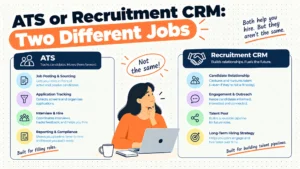
An applicant tracking system manages the workflow after a candidate applies for a job. It handles scorecards and interview scheduling. A recruiting CRM manages the relationship before the role even opens. It handles passive sourcing and talent pool segmentation.
Why do so many talent teams migrate to Lever?
Teams move to Lever when they decide that treating every candidate as a future hire matters more than rigid compliance reporting. The two-way email sync creates a complete communication record automatically. If your team relies heavily on outbound sourcing, this saves hours of manual data entry every week.
Can Ashby handle passive candidate sourcing?
Yes. Ashby positions itself as an all-in-one platform combining applicant tracking and CRM analytics. While Lever is historically famous for its CRM approach, Ashby has built strong proactive talent pipeline management directly into its core product.
How painful is a data migration?
It’s always painful. Exporting candidate profiles from one system and mapping them to another takes weeks of meticulous spreadsheet work. You’ll almost certainly lose some formatting in your historical interview notes. Never underestimate the change management required to pull this off.
Does Workable actually source candidates for you?
Workable includes an AI sourcing feature called People Search. It accesses over 400 million candidate profiles to find passive talent. While it doesn’t replace a dedicated sourcer entirely, it genuinely helps recruiters find matches without leaving the platform or paying extra for outside licenses.
Which tool is best for small businesses?
JazzHR is specifically designed for small businesses with 5 to 100 employees. Starting at $75/month, it covers all the essential workflows without complicated configuration. It limits the financial risk by avoiding per-seat pricing models that punish companies for adding occasional interviewers.
Why would a company choose Recruitee?
Companies choose Recruitee when they want a system that non-HR employees actually enjoy using. The collaborative candidate evaluation profiles allow every team member to leave structured feedback easily. That’s the perfect choice for highly collaborative startups where the whole team interviews.
Are we making a mistake by switching?
If you’re switching just because recruiters don’t like the interface, yes. If there’s a fundamental breakdown in how your business attracts talent, then no. We’ve seen companies double their hiring speed by switching to a tool that fits their process, but we’ve also seen teams waste six months deploying a tool that wasn’t right for them.
Clear, objective software reviews to help your people team build better processes.