TL;DR
- Most HR operations failures trace back to three fixable problems: unclear ownership, disconnected systems, and no audit cadence.
- According to Gartner’s 2024 HR Technology Survey, 58% of HR leaders reported that manual process errors in core HR operations cost their teams more than 20 hours per week in rework.
- Work Institute’s 2023 Retention Report found that 34% of voluntary turnover is directly attributable to poor onboarding and HR process failures in the first 90 days.
- If you’re running HR for a company between 150 and 1,500 employees and haven’t audited your core workflows in the last 18 months, you almost certainly have compliance gaps you don’t know about yet.
- Start with a process ownership map before you buy any new software. The tool is never the problem. The missing accountability structure is.
- This guide gives you a 7-step framework, four decision tables, and a per-step checklist you can run in your next planning cycle.
In late 2023, a 1,200-person logistics company in Atlanta decided to fix its HR operations by buying a new HRIS. The VP of People had inherited a patchwork of spreadsheets, a legacy payroll system, and an onboarding process that lived in someone’s email drafts folder. The vendor promised a six-month implementation. Eighteen months later, the company had spent $340,000 on licensing and consulting, and the team was still running parallel processes because nobody had mapped who owned what before the software went live. The system was fine. The operating model underneath it was broken from the start.
This is not an unusual story. According to Gartner’s 2024 HR Technology report, 61% of HR technology implementations that fail do so not because of product defects but because of inadequate process design before deployment.
Best tools for HR Operations
This article breaks down 7 operational steps, extracts the root causes behind the most common HR ops failures, and gives you a diagnostic checklist to apply immediately.
Why HR Operations Is Still Broken in 2026
Ownership is assigned but never enforced: Most HR teams I’ve worked with have a RACI chart somewhere in a shared drive nobody opens. Ownership on paper means nothing without a review cadence to back it. A 400-person fintech company I advised in 2024 had seven people listed as “responsible” for I-9 compliance across three systems. When an audit request came in, nobody could produce clean records because everyone assumed someone else had it covered. The resulting remediation cost $47,000 in legal and admin fees.
Systems multiply faster than integrations do: According to Mercer’s 2024 Global Talent Trends report, the average HR team at a 500-person company now manages 11 separate HR technology tools. Most of those tools don’t talk to each other cleanly. Data lives in silos. Reporting requires manual exports. And every manual export is a point of failure where someone pastes the wrong column or runs the wrong date range. By the time the error surfaces, it’s already in a board deck.
Compliance is treated as a one-time event: The specific, measurable consequence here is easy to see: the EEOC received over 81,000 workplace discrimination charges in fiscal year 2023, and in the majority of HR-related audits I’ve been involved in, the documentation gaps were not intentional. They were the product of a compliance process that ran once at implementation and was never touched again. You can’t set and forget employment law. State-level changes to leave, pay transparency, and classification rules now happen on an almost quarterly basis in California, Colorado, and New York alone.
Each of these failures has a solution, and the rest of this article walks through each one in sequence.
What Is Core HR Operations?
HR operations is the discipline that designs, manages, and improves the processes and systems that run the employee lifecycle from hire to separation. It’s the operational backbone of a People function, not the strategy layer and not the culture layer, but the infrastructure that makes both possible.
In practice, HR operations follows a predictable workflow across the employee lifecycle:
- Requisition and headcount approval: defining the role, getting budget sign-off, opening the req in your ATS.
- Hiring and onboarding: offer generation, background checks, I-9 and tax form collection, system provisioning, and the first-90-day experience.
- Ongoing employee data management: changes to compensation, title, location, manager, and employment classification, all recorded in a system of record.
- Payroll and benefits administration: payroll runs, benefits enrollment windows, life event changes, and ACA or equivalent compliance reporting.
- Offboarding and separation: final pay calculations, equipment returns, COBRA notifications, exit interviews, and record retention.
When this workflow runs cleanly, HR leaders get their time back for the work that actually moves the needle: building culture, developing managers, and aligning workforce strategy to business goals.
Why HR Operations Fails (Even With Enterprise-Grade Tools)
No accountability system: Most HR teams assign process ownership at implementation and never revisit it. People leave. Roles change. The person who “owned” leave administration two years ago now runs talent acquisition, and nobody updated the ownership map. The system logs the process, but no human is actually checking the outputs against a standard. When a payroll error or a missed accommodation request surfaces, the team discovers the gap has been compounding quietly for months. Accountability gaps compound over months into systemic errors, and those errors are usually most visible during the worst possible moments: an audit, a termination dispute, or a funding round due diligence.
No specialized expertise: HR generalists are genuinely good at a lot of things. Running complex payroll tax calculations for multi-state employees, interpreting FMLA eligibility edge cases, and managing ACA affordability testing are not always in that set. Deloitte’s 2024 Global Human Capital Trends report found that 44% of HR leaders said a lack of specialized operational expertise was a top barrier to improving HR function performance. You can buy a system that automates ACA reporting, but if nobody on your team understands what the output is supposed to look like, the automation produces confident-looking errors nobody catches.
No lifecycle tracking: HR processes have shelf lives. An onboarding checklist built for a 50-person startup doesn’t scale to 500 employees with a remote workforce in four states. A benefits administration workflow designed before your company went public doesn’t account for Section 16 officer requirements. According to IBM’s Smarter Workforce Institute, 67% of HR process failures in growing companies are traced back to workflows that were never updated after a significant organizational change. The process worked once. Nobody tracked whether it still worked after the company changed around it.
No compliance discipline: Compliance in HR operations isn’t a checkbox you tick during implementation. California’s AB 2188 (cannabis use protections), Colorado’s EPEWA pay transparency rules, and the EU AI Act’s requirements for automated decision-making in hiring all came into effect or materially changed between 2023 and 2025. If your compliance review runs annually at best, you’re already behind. EEOC penalties for recordkeeping violations can reach $1,100 per violation per day. State-level wage-and-hour penalties in California routinely result in settlements exceeding $500,000 for mid-size employers who had no malicious intent but had bad documentation practices.
The gap between running HR operations and running HR operations with discipline is where every major failure described above occurred.
What to Look For in HR Operations Platforms and Tools
Explainability at the decision level: When your system makes a recommendation or flags an issue, you need to understand why. This matters most in areas like leave eligibility, accommodation requests, and pay equity analysis. If a manager asks why an employee’s FMLA leave was flagged for review and your answer is “the system said so,” you have a liability problem. Look for platforms that surface the data inputs behind any automated output, not just the output itself.
A structured audit cadence built into the workflow: The best HR ops platforms don’t just store data. They surface it on a schedule. Look for tools that support configurable audit triggers: quarterly I-9 re-verification checks, annual benefits eligibility audits, and real-time alerts for missing required fields. A 90-day review cadence for new hire documentation is a reasonable baseline. If the platform requires manual effort to generate that audit view, it’s adding work rather than removing it.
Security and compliance certifications: At minimum, any platform handling employee data should hold SOC 2 Type II certification. For companies with EU employees, GDPR-compliant data processing agreements are non-negotiable. If you’re in healthcare adjacent roles, HIPAA compliance matters for benefits data. ISO 27001 certification is a strong signal for enterprise-grade security posture. Don’t accept a vendor’s self-attestation on security. Ask for the actual certification documentation and the last audit date.
Integration without data duplication: Your HR operations platform should connect cleanly to your HRIS (Workday, BambooHR, Personio), your ATS (Greenhouse, Lever, iCIMS), your payroll processor, and your benefits carrier. Data duplication is where errors live. If onboarding a new employee requires entering the same data into three systems manually, you will eventually have three different records with three different hire dates. Confirm that integrations are bidirectional and that field-level mapping is configurable, not fixed.
Pilot program availability: Any vendor unwilling to offer a structured pilot is selling you certainty they don’t have. A 60-to-90-day pilot on a defined subset of your population (a single department, a single location, a single workflow) gives you real implementation data before you’re committed to a multi-year contract. Use that window to test the onboarding workflow, run a mock audit, and measure how long it takes your team to learn the system. The pilot is where you find the gaps.
Transparent pricing tied to outcomes: Per-employee-per-month pricing is standard in HR tech, and it’s generally fine. What isn’t fine is pricing that hides implementation fees, data migration costs, and training costs in a separate statement of work that doesn’t appear until contract signing. Ask for total cost of ownership in year one and year two. Get the implementation estimate in writing. If the vendor can’t tell you what a clean implementation costs within a reasonable range, that’s a negotiating tactic, not a feature.
Post-implementation support with a named SLA: The first 90 days after go-live are where most implementations either stabilize or start to crack. Look for a named customer success manager with a defined escalation path, not just a support ticket queue. Ask what the SLA is for critical issues (payroll failures, data sync errors) versus standard requests. A quarterly business review built into the contract is a reasonable expectation for any platform above $30,000 per year. If the vendor goes quiet after go-live, you’re on your own at exactly the wrong moment.
Best HR Operations Platforms in 2026
Rippling
Rippling is a workforce management platform that unifies HR, IT, and finance operations in a single system. It targets companies from 50 to 2,000 employees that want to run the full employee lifecycle without stitching together six separate vendors.
Rippling’s core mechanism is a single employee record that propagates across every downstream system automatically. When you hire someone, Rippling can provision their laptop, set up their payroll, enroll them in benefits, and add them to their team’s Slack channel from one workflow trigger. The platform supports over 500 integrations and handles multi-state payroll natively, including automated tax filing across all 50 US states. It’s built on a modular architecture, so you can start with HR and payroll and add IT management or spend management as your needs grow. More than 10,000 companies use Rippling as of 2024 public reporting.
Key Features
- Single employee record syncing across HR, payroll, and IT in real time
- Automated multi-state payroll tax filing with direct deposit processing
- Device management and software provisioning built into the onboarding workflow
- Configurable approval chains for headcount, comp changes, and time-off requests
- Native integrations with Greenhouse, Lever, NetSuite, QuickBooks, and Slack
Best For
Companies between 100 and 1,500 employees in tech, professional services, or any industry with a distributed workforce. The ideal buyer is a VP of People or HR Director who is tired of managing separate payroll, IT, and HR vendors and wants a single source of employee truth.
Pricing
Rippling uses modular, per-employee-per-month pricing. The HR and payroll core typically starts around $8 per employee per month based on public reporting, with add-on modules priced separately. Total contracts for a 200-person company commonly run $25,000 to $60,000 per year depending on modules selected. Confirm current pricing with the vendor directly.
Where It Struggles
Rippling’s breadth is also its complexity. Implementations that try to turn on every module simultaneously frequently go over timeline. The IT management features require a minimum level of IT sophistication to configure correctly, and smaller People Ops teams without a dedicated IT counterpart often find those modules underutilized. Customer support response times for non-critical issues have drawn consistent criticism in G2 reviews from 2023 and 2024. It’s not the right call if you need white-glove implementation support or have highly custom payroll requirements for union employees.
Lattice
Lattice is a people management platform that connects performance management, engagement, compensation, and HR data into one system. It targets mid-size companies that want to run rigorous people programs without enterprise-level complexity.
Lattice started as a performance review tool and has grown into a full people operations suite. Its core is a continuous feedback and goal-tracking engine that ties directly to compensation workflows and manager development tools. In 2024, Lattice added HRIS functionality, which means companies can now use it as a lightweight system of record in addition to a performance layer. The platform serves over 5,000 companies globally, with particular strength in tech, media, and professional services. Its analytics layer surfaces trends in engagement, attrition risk, and performance distribution that most standalone HRIS platforms don’t produce without custom reporting.
Key Features
- Structured performance review cycles with configurable rating scales and calibration tools
- Continuous feedback and 1:1 meeting agenda tools built into the manager workflow
- Compensation benchmarking and merit cycle management with equity modeling
- Employee engagement surveys with AI-assisted theme detection in open-text responses
- Native integrations with BambooHR, Workday, Rippling, Greenhouse, and Slack
Best For
Companies between 200 and 2,000 employees where manager effectiveness and performance program quality are a strategic priority. The ideal buyer is an HR Director or Chief People Officer who needs to move beyond annual reviews and build a continuous feedback culture with data to back it up.
Pricing
Lattice’s pricing is modular and per-person-per-month. The engagement and performance modules together typically start around $11 per employee per month based on public reporting. Adding the HRIS module increases that figure. A 300-person company should budget approximately $40,000 to $80,000 per year for a multi-module deployment. Verify current pricing directly with Lattice.
Where It Struggles
Lattice’s HRIS module is newer and doesn’t yet match the depth of dedicated HRIS platforms for complex payroll, benefits administration, or compliance workflows. If you need a true system of record with multi-state payroll processing built in, you’ll still need a separate payroll tool. Some HR teams also report that getting managers to consistently use the feedback and 1:1 tools requires sustained internal adoption work that the platform itself doesn’t fully solve. Lattice works best when there’s organizational commitment to the performance culture it’s designed to support.
BambooHR
BambooHR is an HRIS built specifically for small and mid-size companies that want clean employee data management, straightforward onboarding, and basic payroll without enterprise-level overhead.
BambooHR’s strength is simplicity executed well. The platform stores employee records, manages onboarding checklists, tracks time-off requests, and runs payroll for US-based companies with a level of user-friendliness that most HRIS platforms don’t match. It supports over 120 pre-built integrations including ATS connectors to Greenhouse and iCIMS, and it has strong reporting tools for headcount, turnover, and time-to-hire. BambooHR serves over 30,000 companies globally and has a particularly strong footprint in companies between 25 and 500 employees. Its mobile app is one of the highest-rated in the HRIS category for day-to-day employee self-service.
Key Features
- Custom onboarding workflow builder with e-signature and document collection built in
- Time-off tracking with accrual policy management and manager approval chains
- US payroll processing with automated tax filing for domestic employees
- Employee satisfaction measurement via NPS-style eNPS surveys with trend reporting
- Pre-built integrations with Greenhouse, iCIMS, Slack, QuickBooks, and NetSuite
Best For
Companies between 25 and 500 employees in any industry that need a clean, reliable HRIS without needing to hire an IT team to implement it. The ideal buyer is an HR manager or small People Ops team that is currently running employee data in spreadsheets and needs a proper system of record.
Pricing
BambooHR uses per-employee-per-month pricing. Based on public reporting, the Core plan starts around $6 per employee per month and the Pro plan around $9. Payroll is an add-on. A 150-person company on the Pro plan with payroll should expect roughly $18,000 to $28,000 annually. Always confirm current rates with BambooHR directly.
Where It Struggles
BambooHR is purpose-built for simplicity, which means it hits a ceiling at scale. Multi-country payroll is not supported natively. Benefits administration is functional but not sophisticated enough for companies with complex plan designs or self-insured arrangements. Performance management features are basic compared to dedicated tools like Lattice. If you’re growing past 500 employees or have meaningful international headcount, you’ll likely outgrow BambooHR within two to three years and face a migration project you didn’t budget for.
Workday HCM
Workday Human Capital Management is an enterprise-grade HR platform that covers the full people operations lifecycle, financial planning, and workforce analytics for large, complex organizations.
Workday is the system of record for HR operations at some of the world’s largest employers, including Fortune 500 companies and major public sector organizations. Its strength is depth: it handles multi-country payroll, union workforce management, complex benefits plan administration, position-based org management, and regulatory compliance reporting at a level of configurability that no mid-market HRIS matches. Workday serves over 10,000 organizations globally across more than 175 countries. Its analytics module, Workday Prism, allows HR teams to blend internal workforce data with external benchmarking data for board-level workforce reporting. The system is built on a single data model, which means reporting across HR, finance, and operations runs from one source of truth.
Key Features
- Position-based org management supporting complex hierarchies and headcount controls
- Multi-country payroll processing covering 40-plus countries with local compliance built in
- Workday Prism Analytics for blended internal and external workforce benchmarking
- Benefits administration supporting self-insured, fully insured, and voluntary plan structures
- Native integrations with Greenhouse, iCIMS, ServiceNow, Salesforce, and SAP
Best For
Companies above 1,000 employees, particularly those with international operations, complex workforce structures, or public company reporting requirements. The ideal buyer is a CHRO or VP of HR Operations who needs a single platform to run a global workforce with audit-grade accuracy.
Pricing
Workday does not publish pricing publicly. Based on industry reporting, annual contracts for a 1,000-person company typically start in the $150,000 to $300,000 range, with implementation costs often matching or exceeding first-year licensing. For accurate pricing, request a formal proposal directly from Workday.
Where It Struggles
Workday implementations are long and expensive. A mid-market company going live on Workday HCM should budget 9 to 18 months for implementation and plan for significant internal project management bandwidth. The system’s configurability is also its complexity: poorly designed configurations create technical debt that’s expensive to unwind later. User experience for employees and managers, while improved in recent years, still trails lighter platforms in day-to-day usability. Workday is the right answer when you need enterprise-grade depth. It is definitively the wrong answer for a 200-person company trying to get off spreadsheets.
Personio
Personio is an HR operations platform built specifically for European small and mid-size companies, covering HRIS, payroll, recruiting, and people analytics under one roof with GDPR compliance built from the ground up.
Personio’s differentiator is its European-first design. While US-headquartered HRIS platforms treat GDPR compliance as an add-on or a configuration layer, Personio built its data model around European privacy requirements from the start. The platform manages employee records, payroll for Germany, Austria, Spain, and the Netherlands natively, and supports HR workflows across multi-country European operations with localized compliance rules baked in. It serves over 14,000 companies across Europe, with particular strength in Germany, the UK, and the DACH region. Its reporting layer covers headcount, time tracking, absence management, and payroll with a clean interface that European HR teams consistently rate as more intuitive than US-origin alternatives.
Key Features
- GDPR-native employee data management with configurable retention and deletion policies
- Native payroll processing for Germany, Austria, Spain, and the Netherlands
- Absence and time-tracking management with country-specific leave law rules built in
- Integrated recruiting module with job posting, applicant tracking, and offer management
- Integrations with Slack, Microsoft Teams, Datev, Sage, and Greenhouse
Best For
European companies between 50 and 2,000 employees, particularly those headquartered in Germany, the UK, or the DACH region. The ideal buyer is an HR Director managing a multi-country European workforce who needs GDPR-compliant data management without relying on a US-origin platform’s compliance add-ons.
Pricing
Personio uses modular per-employee-per-month pricing. Based on public reporting, the core HR platform starts around 4 to 6 euros per employee per month, with payroll and recruiting modules priced additionally. A 200-person company on the full suite should expect roughly 25,000 to 50,000 euros per year. Confirm current pricing directly with Personio.
Where It Struggles
Personio’s geographic coverage for payroll is still limited to a handful of European countries, which means companies with employees in France, Italy, or the Nordics will need supplementary payroll solutions. Its analytics layer is functional but not deep enough for companies that need sophisticated workforce planning or predictive attrition modeling. US-headquartered companies looking for a global platform should look elsewhere. Personio is genuinely excellent at what it’s built for. The problem comes when buyers ask it to do things it wasn’t designed to do.
Comparison Table of Top HR Operations Platforms
Use this table as a starting point for your vendor shortlist, not as a substitute for a proper RFP process. Pricing is approximate and based on public reporting as of early 2025.
| Provider | Primary Use Case | Company Size | Starting Price | GDPR Ready | Best For |
|---|---|---|---|---|---|
| Rippling | Unified HR, IT, and payroll operations | 50-2,000 | ~$8 per employee/mo | Yes | Tech companies with distributed US workforce |
| Lattice | Performance, engagement, and people analytics | 200-2,000 | ~$11 per employee/mo | Yes | Companies prioritizing performance culture |
| BambooHR | Core HRIS and onboarding for SMBs | 25-500 | ~$6 per employee/mo | Yes | HR teams moving off spreadsheets |
| Workday HCM | Enterprise HR and global workforce management | 1,000+ | Custom, $150K+ annually | Yes | Complex multi-country enterprise operations |
| Personio | European HRIS and payroll compliance | 50-2,000 | ~4-6 EUR per employee/mo | Yes (native) | European mid-size companies in DACH or UK |
HR Operations Platforms vs. Traditional HR Administration
Traditional HR administration means spreadsheets, shared drives, email threads, and manual processes held together by institutional knowledge. Modern HR operations platforms replace that with structured workflows, a single system of record, and automated compliance checks. The difference isn’t about technology preference. It’s about whether your processes can survive the departure of the person who built them.
| Factor | Traditional HR Administration | Modern HR Operations Platform |
|---|---|---|
| Core function | Manual data entry and file management | Automated workflow execution with audit trail |
| Services included | Whatever the HR team can track manually | HRIS, payroll, onboarding, compliance, reporting |
| Integrations | None or manual exports between systems | Bidirectional API integrations with ATS and payroll |
| Visibility | Whoever owns the spreadsheet has the data | Role-based dashboards accessible across the org |
| Automation | None. Every step is a human task. | Triggered workflows for onboarding, offboarding, and compliance alerts |
The decision point comes down to scale and risk tolerance. If you’re running a 40-person team with a single HR generalist and low employee turnover, a well-organized spreadsheet system with clear ownership can work. But once you cross 150 employees, have operations in more than one state, or are growing faster than 20% per year, the manual model creates compliance exposure you can’t see until it costs you. At 500-plus employees with multi-location operations, the volume of employment law changes, payroll variables, and onboarding tasks exceeds what human pattern recognition can track reliably. That’s not an opinion. It’s a workload calculation.
How to Choose the Right HR Operations Platform
Match your situation with the right platform:
| Your Situation | Best Fit | Also Consider | Avoid | Why |
|---|---|---|---|---|
| US-based, 100-500 employees, currently on spreadsheets | BambooHR | Rippling | Workday | BambooHR implementation is fast and low-risk at this size |
| Tech company, 200-800 employees, need unified HR and IT provisioning | Rippling | BambooHR | Personio | Rippling’s device management and HR in one system eliminates a separate IT vendor |
| Performance culture is a top priority, 200-1,500 employees | Lattice | Rippling | BambooHR | Lattice’s performance and engagement depth far exceeds basic HRIS tools |
| European HQ, 50-1,000 employees, GDPR compliance is non-negotiable | Personio | Workday | BambooHR | Personio’s GDPR-native architecture removes compliance configuration risk |
| Enterprise, 1,500-plus employees, multi-country payroll and finance integration | Workday HCM | Rippling | Lattice | Only Workday handles this complexity natively at enterprise scale |
Final Thoughts
HR operations isn’t broken because companies lack tools. It’s broken because most People teams deploy tools into an accountability vacuum and expect the software to fix what is actually a process design problem.
Companies under 200 employees should resist the urge to buy enterprise-grade platforms. Pick one system of record, map ownership before you go live, and build a 90-day audit habit before you add a second tool. At 500-plus employees, the calculus shifts: you need a platform with real compliance automation, bidirectional integrations, and role-based reporting that doesn’t require your HR team to be the data custodian for every downstream system.
What I’ve seen across every case study, failure mode, and platform profile in this article is a consistent pattern: the companies that run clean HR operations don’t have better software than everyone else. They have clearer ownership, a defined review cadence, and a bias toward documenting processes before automating them. The Atlanta logistics company that spent $340,000 on a failed HRIS implementation didn’t have a technology problem. They had an operating model problem with a technology price tag attached to it. That’s a preventable mistake, and the prevention doesn’t cost anything except the discipline to slow down before you sign a contract.
The most defensible starting point for most companies in the 150-to-800 employee range is Rippling, because its unified employee record eliminates the data duplication problem at the source and its modular architecture means you can start narrow and expand without a re-implementation. Start with HR and payroll, run a 90-day pilot, and measure rework hours before and after. Revisit your HR operations stack every 12 to 18 months. Regulatory changes, headcount growth, and new product releases mean last year’s right answer may not be next year’s.
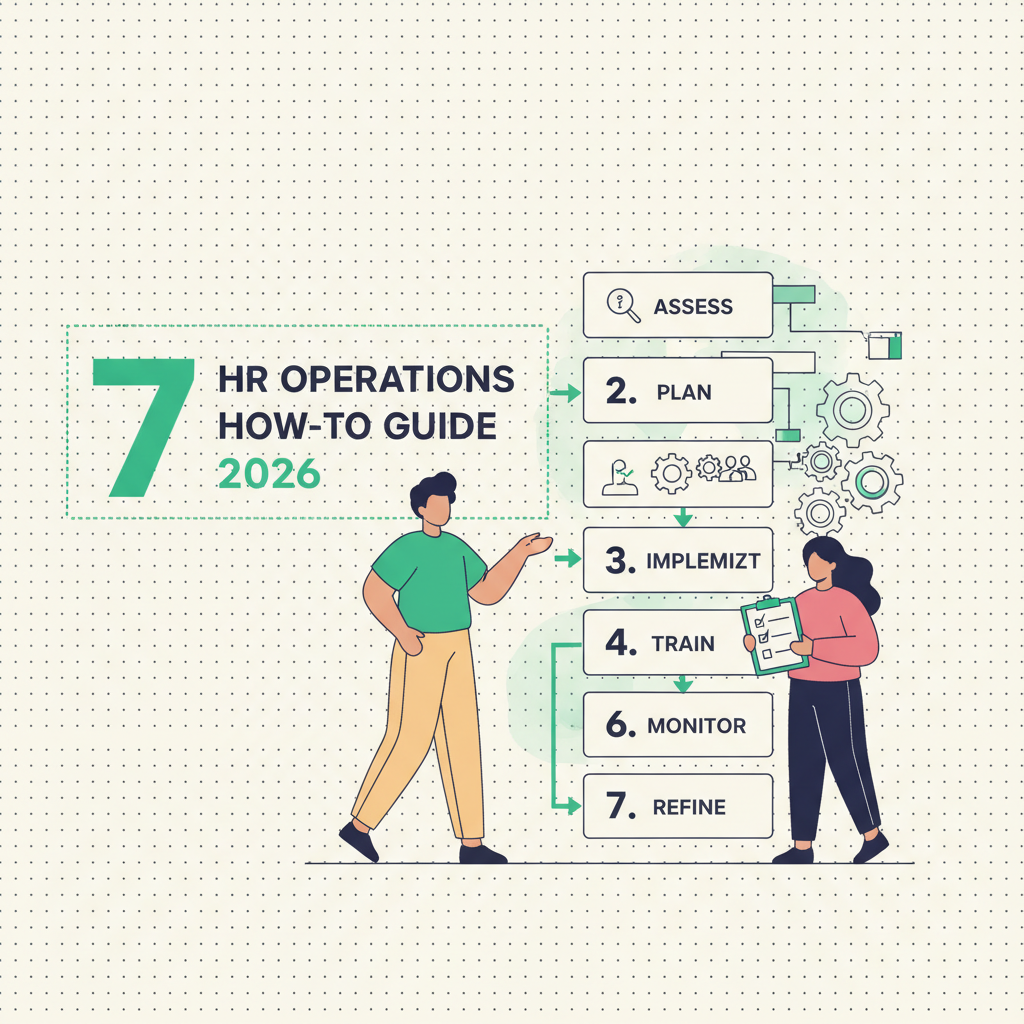
The HR Operations How-To Guide: A 7-Step Framework to Fix Your Ops
Fixing HR operations is not a software purchase, it is a sequencing problem. Run these seven steps in order, before you sign a new vendor contract, and you fix the operating model the tool will eventually sit on top of.
- Name one accountable owner per process, not a committee. Replace every RACI chart that lists three or more “responsible” people with a single name and a documented backup. The Atlanta logistics company’s $340,000 implementation failure traces directly to this gap: nobody owned the pre-launch process design.
- Audit the last 18 months of lifecycle data for silent gaps. Pull every I-9, every classification change, every ACA affordability calculation from the past 18 months. If you haven’t done this audit in that window, assume undiscovered gaps exist.
- Inventory your tech stack and mark every manual export. At an average of 11 HR tools per 500 employees, list each system, what it holds, and whether data moves to it automatically or via manual export. Every manual export is a documented failure point.
- Build a quarterly compliance calendar, not an annual one. California, Colorado, and New York change leave, pay transparency, or classification rules on a near-quarterly cycle. Assign one compliance owner per state where you have employees, with a hard quarterly review date on the calendar.
- Redesign onboarding around day 1, 30, 60, 90 checkpoints. Since roughly a third of voluntary turnover ties back to poor onboarding and process failures in the first 90 days, build automated milestone checks at each interval with a named owner for each checkpoint, not just a welcome-week checklist.
- Install a standing audit cadence before you touch new software. I-9 re-verification quarterly, benefits eligibility annually, payroll spot-checks monthly. Write the cadence into the calendar with an owner and an escalation path, independent of any platform.
- Pilot for 30-60-90 days and measure error rate, not features. Before a company-wide rollout, run any new system against a single department for 90 days. Track rework hours and documentation errors weekly. If the pilot doesn’t reduce measurable error rate, the operating model, not the tool, still needs work.
Each step depends on the one before it. Skipping step 1 and jumping to step 7 is exactly how the $340,000 implementation failed: a good system layered onto an operating model with no accountable owner underneath it.
Your 90-Day Ownership Map and Audit Cadence Template
Once you’ve run the 7-step sequence, you need a living document, not a one-time exercise. Below is a working template HR ops leads can populate in a single planning session and revisit every quarter.
| Process | Owner | Backup | Review Cadence | Escalation Trigger |
|---|---|---|---|---|
| I-9 / E-Verify | Named HR Ops Lead | Named backup | Quarterly | Any missing field >5 days |
| Benefits eligibility | Benefits Admin | Payroll Lead | Annual + on hire spike | >3% eligibility variance |
| ACA affordability | Payroll/Compliance | Finance liaison | Quarterly | Any employee near 30-hr threshold miscoded |
| State leave & pay transparency | Compliance owner per state | Legal counsel | Quarterly | Any new state statute effective date |
| Onboarding milestones | People Ops Coordinator | Hiring manager | Day 1/30/60/90 | Missed checkpoint at any interval |
Populate the owner and backup columns with real names, not job titles alone. Job titles change hands quietly; names on a document force someone to notice when a handoff happens and update the record. Set a recurring calendar hold for each review cadence, owned by the same person listed in the table, and require a written sign-off, even a one-line email, every time a review runs. That sign-off is your audit trail when a regulator or an acquirer’s diligence team asks for documentation.
The escalation trigger column is the piece most teams skip, and it’s the piece that prevents the $47,000 remediation scenario from the I-9 compliance example. A trigger without a threshold is not actionable; “review periodically” is not a trigger. Attach a number: five days for a missing field, three percent for benefit eligibility variance, one missed onboarding milestone for immediate escalation to the hiring manager’s manager.
Review the entire table every 90 days, not annually. State employment law changes on a near-quarterly cycle in several large states, and a table that’s accurate in January is frequently stale by April. Build the 90-day review itself into the cadence column of the table, with HR leadership as the owner of that meta-review. This is the single artifact that turns “we have a process” into “we can prove we have a process,” which is the difference auditors, and acquirers, actually care about.
Related reading
Frequently Asked Questions
How often should HR operations processes be audited?
Run a full audit at least every 90 days for high-risk items like I-9 documentation, and annually at minimum for benefits eligibility and broader workflow design. If you haven't audited core HR workflows in the last 18 months, assume you have undiscovered compliance gaps, since state employment law changes on a near-quarterly cycle in states like California, Colorado, and New York.
Should I fix my HR operating model or buy new software first?
Fix the operating model first. Buying software without a documented process ownership map is how a company can spend hundreds of thousands of dollars on an HRIS implementation and still run parallel manual processes eighteen months later. Map who owns each process, build the audit cadence, then select a tool that supports that structure.
Who should own I-9 compliance in a mid-size company?
One named person, with one named backup, not a committee. Listing multiple people as jointly responsible is a common failure pattern: when an audit request comes in, everyone assumes someone else has it covered and nobody can produce clean records, which turns into a costly remediation project.
What's a reasonable review cadence for new hire documentation?
A 90-day review cycle is a reasonable baseline for new hire documentation, paired with checkpoints at day 1, 30, 60, and 90 during onboarding itself. This catches missing I-9 fields, incomplete tax forms, or provisioning errors before they compound into a larger compliance gap.
Why do HR technology implementations fail even when the software works?
Most failures come from inadequate process design before the software goes live, not from product defects. If ownership, integration points, and audit cadence aren't mapped before deployment, teams end up running the new system alongside old manual workarounds indefinitely, which is exactly what happened in the Atlanta logistics company case.
How do I know if my HR operations have compliance gaps I haven't found yet?
If you manage a company between roughly 150 and 1,500 employees and haven't formally audited core workflows in the last 18 months, assume gaps exist. Start by pulling I-9 records, classification changes, and ACA affordability calculations from that period and checking them against current requirements before an external audit forces the discovery.